
Loyalty - Usage in Selligent
With the Loyalty program you can reward your loyal customers and encourage them to make future purchases and further interact with your brand, leading to better sales, brand awareness and trust.
After setting up the lists, transactional message and transactional journey in Selligent by Zeta, and configuring the Loyalty integration with Selligent, you can start using the Loyalty program in Selligent by Zeta.
Note: When you're interested in getting started with Loyalty, please get in touch with your Zeta contact.
Prerequisites
-
The Selligent setup of lists, transactional message and transactional journey has been done.
This includes the following :-
An Audience List has been set up.
-
Another list (preferably a Data List) is created, containing at least a userid field.
-
-
A transactional message is created, linked to the Audience List.
-
A Transactional Journey is created, containing the transactional message, and linked to the Audience List.
-
-
The Loyalty integration with Selligent is done.
This includes the following :-
A Loyalty connector has been set up, which contains the link to the Selligent Business unit name, the domain for the API call (eg. https://subdomain.domainname.com) and the API secret and key.
-
For event-based triggers (e.g. sending messages when new members join, when they earn rewards, etc), one or more Loyalty action triggers have been configured and are published, containing :
- parameters : Selligent Transactional Journey action type, the connector profile, the Selligent Transactional Journey to be executed and the language for which the transactional messages will be sent.
- personalization details : one or more field configurations linking to the Selligent main or extended loyalty profile, the Selligent field name, the Loyalty member data type, and the Loyalty member field name. -
For date-based actions that don't trigger a change in the system (e.g. sending birthday messages, notifications of expiring offers, etc), scheduled jobs have been configured.
-
Triggering of the API call
Once everything is set up, the following will for example be executed (below is just one of the many ways in which the integration can be used) :
-
A customer for example makes a purchase and signs up for your Loyalty program.
-
A lookup occurs to see if they're a Loyalty Member.
-
If not yet recognized as a Loyalty Member, a new member profile will be created.
-
As a triggered action was created in Loyalty, this will be executed with the parameters and personalizations set.
-
An Selligent API call is triggered to update the contact's profile with the given data (main Audience List and/or Loyalty Profile Extension).
If the contact does not yet exist in Selligent, they are automatically created. -
Finally, the Transactional Journey sends out the transactional message to the contact.
A typical Loyalty flow for Selligent would be like this :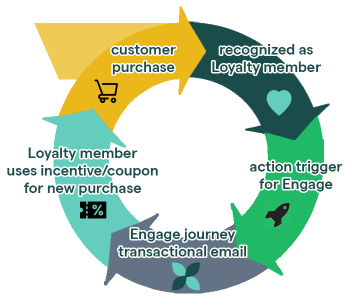
The transactional message could contain an incentive for the customer, which may lead to a new purchase and the flow starting over again.
Further usage of Loyalty data
The cycle above shows that thanks to the Loyalty program, a loyal customer can be rewarded and become a true Loyalty member, which can lead to additional actions, more brand purchases, more/better customer rewards by using a tier-based system, and so on.
As audience data and loyalty data is gathered and saved in Selligent by Zeta, this data can be used to analyze reporting coming from the transactional messages sent, to target the right audience with more tailored info through new campaigns.
 Related Topics