
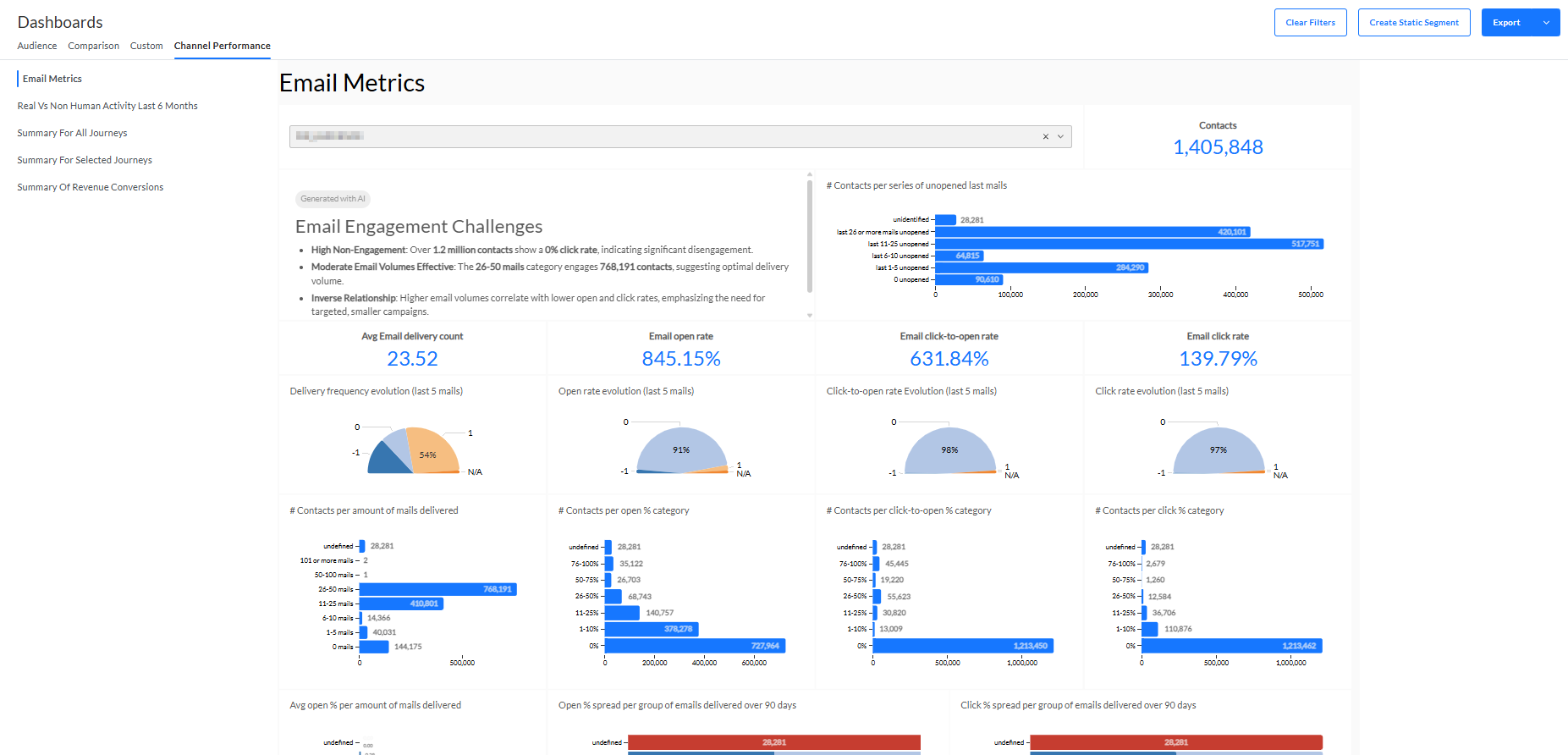
The Email Metrics dashboard shows email engagement metrics of a selected target audience.
Note: This dashboard is visible to all Selligent users with Dashboard permissions, but when you're not using the Engagement Metrics feature, no data is displayed in the dashboard.
At the top, you can select any Audience List, and a time span (either for the 'days since the last email delivery', or the 'days since the last email open').
Note: The default Audience List is selected when there's one configured. If that's not the case, the list with the smallest ID is selected.
Important: Please be aware to select the correct audience. It may occur that an Audience List is not activated for EMIT and therefore shows no data.
- An AI-generated summary of this dashboard is displayed at the top.
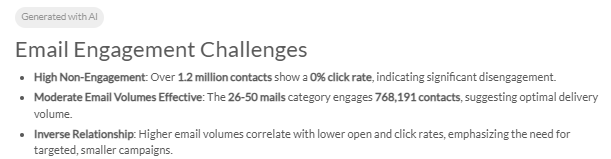
Different from all other dashboards, only the audience and the time span can be selected as filters. The data shown in the widgets will be updated accordingly :
- Contacts — The total number of contacts for the selected audience.
- # Contacts per series of unopened emails — The number of contacts who have not opened their last emails, grouped per last 1-5 unopened emails, 5-10, and so on.
- Avg Email delivery count — The average number of emails that have successfully been delivered to the target audience over the selected time span.
- Email open rate — The percentage rate of emails that have been opened by contacts of the audience over the selected time span.
- Email click-to-open rate — The percentage rate of emails that have been clicked after being opened by contacts of the audience over the selected time span.
- Email click rate — The percentage rate of emails that have been clicked by contacts of the audience over the selected time span.
- Delivery frequency evolution (last 5 mails) — The percentage of the last 5 emails that have successfully been delivered to the audience over the selected time span.
- Open rate evolution (last 5 mails) — The percentage of the last 5 emails that have been opened by contacts of the audience over the selected time span.
- Click-to-open rate evolution (last 5 mails) — The percentage of the last 5 emails that have been clicked after being opened by contacts of the audience over the selected time span.
- Click rate evolution (last 5 mails) — The percentage of the last 5 emails that have been clicked by contacts of the audience over the selected time span.
- # Contacts per amount of mails delivered — The number of contacts (blue bars) per amount of delivered emails (x-y mails on the left).
- # Contacts per open % category — The number of contacts (blue bars) per percentage of opened emails (x-y% on the left).
- # Contacts per click-to-open % category — The number of contacts (blue bars) per click-to-open percentage (x-y% on the left).
- # Contacts per click % category — The number of contacts (blue bars) per click percentage (x-y% on the left).
- Average open % per amount of mails delivered — The average email open percentage rate (blue bars) per amount of delivered emails (x-y mails on the left).
- Open % spread per group of emails delivered over 90 days — The number of contacts (bars with values) that opened a certain percentage of emails (% on the bottom), over 90 days, per group of emails that were delivered (x mails on the left), for the selected audience and time span on top.
- Click % spread per group of emails delivered over 90 days — The number of contacts (bars with values) that clicked on a certain percentage of emails (% on the bottom), over 90 days, per group of emails that were delivered (x mails on the left), for the selected audience and time span on top.
Note: Please take into account that the most recent email interactions are not shown right away. There can be a delay up to 2 days, before they're visible in the dashboard.
Note 2: While datasets used for the dashboards keep historical info from the last 12 to 18 months, EMIT only keeps data from the last 3 months (or optionally 6 months). The EMIT limit is the one that determines the available data shown in the Email Metrics dashboard.