7 Proven Best Practices for Email Generative Engine Optimization (Email GEO)
Quick Summary:
-
Who’s affected — all of your customers, across all email popular clients, and the trend is accelerating.
-
What breaks — offers, amounts, multi-offer emails, disclaimers, special characters, and more.
-
What to do first — use the Hidden Summary for AI with the offer or focus of message + deadline in plain language; ensure the first paragraph also states the offer or focus of message and deadline plainly; and proof messages on devices and email clients to see summaries.
-
Don’t — rely on clever subject/preheader continuity; avoid using * symbols next to numbers when possible; and avoid multiple offers and non-linear copy.
Problem Overview
Since late 2024, AI summaries have been changing emails:
-
In the Primary tab and List View, Apple Intelligence replaces preheaders with summaries, sometimes communicating incorrect offers.
-
Yahoo is replacing some subject lines with AI summaries.
-
Google is also now replacing content in the inbox.
-
Most email clients also show post-open summaries at the top of the message.
Customers have shared numerous stories of misleading summaries in the inbox when AI became confused; some examples are listed below:
-
Promising non-existent cash payouts
-
Promising discounts of over 100% (which would mean the item is not only free—you would be paying the customer to take it)
-
Switching numbers—for example, presenting the last four digits of a credit card as the monthly bill amount in the inbox summary
-
Emails with multiple offers and terms being incorrectly represented
-
Image-based emails being represented in the inbox as “Learn how to unsubscribe”
-
Problems with special characters (see section later in this User Guide)
How to Help AI Summaries More Accurately Explain Your Message
Within Cheetah Digital by Zeta, you have a powerful tool to help: use the Hidden Summary for AI, along with the best practices documented below, to help reduce the risk of AI summaries showing incorrect offers or otherwise misrepresenting the message. These tips help with all tested email clients to date that use AI to summarize.
There is no guarantee that following this document will stop email clients’ AI from misrepresenting your message in a pre or post-open summary, but these common-sense strategies can help the AI do a better job.
What Email Client AI Looks For
In testing, some email clients’ AI scan the top part of the message to look for three things for the inbox summary:
-
Offer (or focus of the message)
-
Time sensitivity of the offer or message
-
Conditions and disclaimers (in some cases)
The email client AI will then typically construct a summary that explains the offer (or purpose) and, if applicable, the time sensitivity.
Marketing language meant to inspire, create emotion (excitement, longing), or drive desire to purchase will be ignored by email client AI. Email client AI is looking to identify and report the offer (or message focus) and time sensitivity in a single concise line in the inbox.
Best Practices
Best Practice #1: Use the Tool and the Formula
Use Cheetah Digital’s Hidden Summary for AI to invisibly explain the offer (or message focus) and time sensitivity of your message to the email client.
The best Hidden Summaries for AI will follow this formula in a sentence of less than 200 characters:
The offer or focus of the message + The time sensitivity / urgency of the message
If your email contains conditions and disclaimers that you see in proofs that Apple Intelligence is using as the entire inbox summary (as was described above), experiment with this format in a natural sentence of ideally 200 characters or less for the Hidden Summary for AI:
The offer or focus of the message + any applicable conditions or disclaimers that may appear later in the email + The time sensitivity / urgency of the message.
If the sentence is awkwardly constructed, there is risk that it will not be understood.
Here is a classic example:
Subject Line: {(name_first)} here is a special to keep you warm this winter
Preheader: 25% off Ladies’ Wool Overcoats
Hidden Summary for AI: Save 25% on Ladies’ Wool Overcoats, sale ends on December 12, 2025
This example is shown entered below. Notice that you can drag the bottom right corner of the entry field for the Hidden Summary for AI to make it larger, so that you can see what you have entered.
The Hidden Summary for AI supports up to 2,000 characters, to support descriptions of image-based emails that have little live text.
When third party testing was conducted, the testers found that the optimal size for influencing AI summaries in the Hidden Summary for AI is a plainly worded description of the main offer and the time sensitivity within 200 characters.
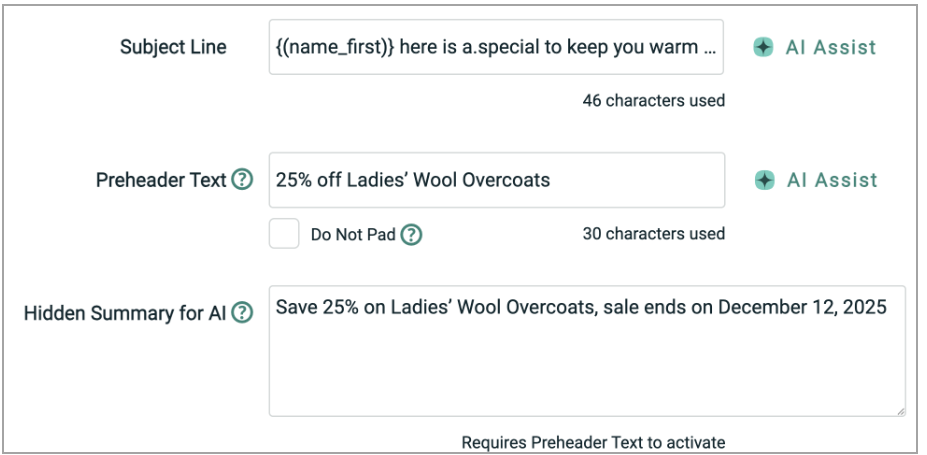
Note: The Hidden Summary for AI requires that there also be a preheader created using the Cheetah preheader tool.
Best Practice #2: Say the Important Info First
This is a classic best practice: ensure critical information ie offer, CTA, & any deadline, is at the top of the email. Many customers will only read this far into an email, and this is all your customers will likely see in the Apple category tab digest view. For Apple Intelligence, this first content seems to have elevated importance for summaries that appear in the inbox. Post-open summaries consider the entire message.
Best Practice #3: Be Single-Minded and Linear
Avoid combining multiple offers with different terms or conditions in one email. AI summaries have been shown to have trouble with emails that have many content blocks about different subjects, products, promotions, etc., it increases risk that the AI will miss-summarize. Keep messages focused on one idea, one offer, with a linear flow of copy, never requiring jumping around to understand an offer (for example, needing to jump to the very bottom to read a disclaimer for an offer at the top creates risk of misinterpretation).
Best Practice #4: Don’t Depend on Catchy Subject Line / Preheader Combinations
In many cases, only your preheader will be seen and not the subject line (Yahoo), or your subject line will be seen but not the preheader (Apple). Avoid starting a sentence or offer in the subject line and completing it in the preheader. Only one may be seen—or neither may be seen. Each must be able to stand on its own.
Best Practice #5: Send Proofs to Devices and Clients that Summarize
Send proofs to mobile phones and email clients that create summaries. In the case of Apple, view both the preheader replacement in the list view, and also review the post-open summary to learn how Apple Intelligence understood (or misunderstood) your email overall.
Best Practice #6: Use Schema.org, Especially for Transactional Emails
Schema.org is the pre-AI method of using structured values/data in emails, that tells the email client the details about airline reservations, etc..
Schema.org is a best practice especially for critical transactional emails like hotel bookings, flight information, or tracking information. The information that you would convey using Schema.org may be the same information that you would be entering into the Hidden Summary for AI.
You can most easily use Schema.org in emails in Cheetah by creating an HTML template for the values/data that are relevant for most of your emails, for example flight information, calendar events, hotel bookings, etc..
-
For Content Designer emails, you would paste the template using Advanced Editor into a content block, and use merge fields for the data in transactional emails. For promotional messages, you might manually edit the data.
-
For emails created in the Advanced Editor, you also could simply directly add the markup (likely with merge fields populating the data, like pulling a customer’s flight number) for Schema.org in the email’s HTML.
Best Practice #7: Be Careful with Special Characters Next to Numbers
Some customers have reported issues with Apple Intelligence misinterpreting and changing special characters as described in the section below. Avoid placing special characters directly next to numbers; they can be interpreted as additional digits. For example, $50* could become $500. Where possible, write out symbols, since they have been reported as misunderstood or misrepresented by email client AI.
Image-Based Email Guidance
Email client AI will ignore alt text and text that is part of an image. Many inbox summaries of image-based emails that use alt text appear as just “How to unsubscribe,” “View in Browser,” or “No Content Found” in the inbox because there is no other live text. Post-open summaries at the top of image-based emails are typically blank.
Alt text is very important for users of screen readers, but not useful for explaining your message to email client AI. See this user guide for how to create accessible emails in Cheetah Digital.
You have likely seen image-based emails appear like this in the Apple Mail app:
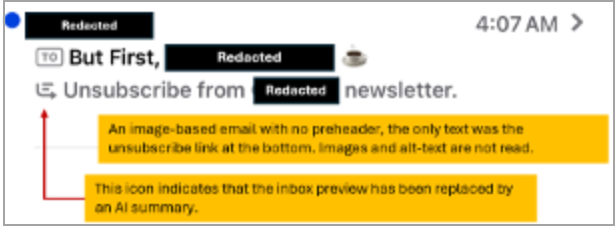
The Cheetah Hidden Summary for AI supports up to 2,000 characters to help you explain your image-based message so that it can be properly summarized in both the short inbox summary (Yahoo subject line replacement or Apple preheader replacement) and the longer summary that appears now at the top of the message in most email clients.
If you choose not to use the Hidden Summary for AI, the alternative is to use live text rather than text in images. Content Designer supports this through responsive layout options and the ability to stay on brand with custom web fonts. Click here for the User Guide for using custom web fonts in Cheetah Digital by Zeta.
Frequently Asked Questions
Can I simply copy my preheader into the Hidden Summary for AI field?
To be effective the Hidden Summary for AI must provide a clear, plain-language explanation of the main offer (or purpose) and the time sensitivity. This is what inbox AI is looking for; if it is not obvious, the AI may infer the offer and time sensitivity incorrectly.
Marketing language intended to inspire emotion (for example, excitement or longing) or drive desire to purchase will typically be ignored by email client AI. Email client AI is looking to identify and report the offer (or focus) and time sensitivity in a single concise line in the inbox.
If your preheader fits this formula, then it could also be copied as the text for the Hidden Summary for AI.
Can I use the Hidden Summary for AI with preheaders coded in the HTML, rather than using the Cheetah Preheader tool?
No. The Hidden Summary for AI field cannot be used unless the Cheetah preheader field has been populated first.
With the recent changes to Apple’s Mail App, is there any reason to continue to create preheaders?
Yes. Less than 50% of your customers will view your emails on an Apple device that supports Apple Intelligence. Your preheaders will remain intact for most of your audience. See this user guide to learn how to write engaging preheaders.
If we see how AI summarized our message on one iPhone, will it be summarized the same way on another iPhone? Does everyone see the same summaries?
No. At least in the case of Apple Intelligence, the summary is generated on each individual device after the message is downloaded. As a result, different iPhones receiving the same message may show different summaries.
We use the API to create email campaigns in Cheetah, does the API support preheaders and the hidden summary?
Yes. The email campaigns API supports both. See the documentation here.
What is the character limit for the Hidden Summary for AI?
2,000 characters, to support describing image based emails.
Does the field support personalization / merge fields?
Yes, as does the subject line and the preheader. These fields can be a combination of text and personalization / merge fields, or can contain only personalization / merge fields if the subject line, preheader, and/or hidden summary fields are being imported at time of merge from a data source.
Appendix:
Some Customers Have Reported Issues with Special Characters and Disclaimers
We have heard reports that Apple Intelligence has misunderstood or changed special characters in summaries, or misidentified disclaimers as the most representative information in the email.
-
One customer who frequently uses the * character in emails to indicate a disclaimer at the bottom reported two issues when proofing on an iPhone:
-
When * followed a number, Apple Intelligence replaced * with a 0 in the inbox summary, increasing the number by one digit.
-
In some cases, * followed by disclaimer text at the bottom of the email became the summary that replaced the preheader.
-
Although it is not possible to know for sure why this happened, it likely indicates two shortcomings in the AI:
-
Because the offer was non-linear and the disclaimer was at the bottom of the email—separated from the offer it referred to—Apple Intelligence may not have understood the context connecting the disclaimer and the offer.
-
The disclaimer was then likely determined by Apple Intelligence to be the most important part of the message.
-
If you experience this, an alternative could be to state the offer with the disclaimer in a simple, linear sentence in the Hidden Summary for AI, along with the time sensitivity, and then test by sending yourself a proof and opening it in the device or email client you are testing.
-
In the early days of Apple Intelligence, soon after it was activated in the UK, it changed a UK customer’s British-pound amount to a very different value in the inbox summary; it swapped the currency symbol to $ and increased the number, changing the offer to a large cash payout.
-
-
-
Strategies for Accessible Emails Can Also Help AI
Follow the same message guidelines that you would use for accessible messages, use nested H1, H2, H3 headers to tell AI what content is a child or parent to help it follow context.
See this user guide for how to create accessible emails in Cheetah Digital.
History of the Hidden Summary for AI Feature and Technique
The technique for influencing email client AI through a hidden summary near the top of the email was invented for use in Cheetah Digital in October 2024, following extensive testing of the behavior of Apple Intelligence using the Apple Developer beta of iOS18.1. The refined and productized feature was released in the Cheetah Digital Platform in January 2025 with the name ”Hidden Inbox Summary.”
The name was changed to “Hidden Summary for AI” in January 2026 because of the growing prevalence of AI summaries post-open as well as in the inbox.
Through customer-commissioned third party testing the feature has been proven to influence summaries across all primary email clients, with testers of the feature recommending 150 to 200 character summaries for optimal results. It became widely adopted by most users of the Cheetah Digital platform in 2025 to help manage the message that is being shown to their customers.