Managing Consent for Email Open Pixel Tracking in Cheetah Digital
This guide is for information only and does not constitute legal advice. For official guidance, refer to the CNIL recommendation, Recommandation relative aux pixels de suivi dans les courriers électroniques (CNIL, April 14, 2026). Also review our FAQs for more highlights.
Your organization is responsible for ensuring compliance with applicable laws and regulations.
Intended Audience: Technical marketers or expert users who have experience with solution configuration, data management, and advanced setup.
Why consent for email open pixel tracking is important
Email open pixel tracking is commonly implemented using a tracking pixel embedded in email content. When an email is opened, the tracking pixel loads and sends information back to the platform, allowing organizations to measure engagement. Depending on the tracking configuration, the pixel may identify the recipient and support observation and storage of their behavior.
Data protection laws and rules, such as the French data protection authority (CNIL), impose that individual (recipient‑level) email open pixel tracking requires consent, unless the tracking is fully anonymous.
Types of tracking
Individual Tracking (requires consent)
- Recipient identifiers included in the pixel
- Opens tracked per individual
- Used for personalization and personalized analytics
Anonymous Tracking (no consent required)
- No individual recipient identifiers can be tracked
- No aggregate level campaign metrics at this time
Coming Soon: Aggregate level campaign metrics on opens.
Understanding the impact of consent-based tracking
For audiences who have explicitly withdrawn consent or where consent is unknown:
- Opens are recorded at an aggregate level only
- No individual-level tracking of open pixel activity is available
- These audiences will not appear in open-based filters or exports
Recommendations
- Clearly inform recipients about:
- What type of tracking is used
- What data is collected
- Why it is used (purpose)
- Who uses it
- Collect consent before tracking opens:
- Provide a link to more detailed information (for example, a "cookies and other trackers" policy, or via a consent link in a tracking-pixel-free email)
- For new audiences, it is recommended that consent be collected at the time of collecting the email address.
- See Recommendation 4: Granular consent by purpose is a longer term goal and will not be implemented in Cheetah Digital before July 14, 2024. In the interim, general consent for open pixel tracking will be used.
- Allow recipients to withdraw consent at any time
- Store proof of consent. See Recommendation 5
Consent is NOT required when:
- Tracking is strictly necessary for security or authentication
- Tracking is limited to deliverability, with strict data minimization. Only the date of the last known email opening should be retained by day, without recording the time. The retained date should be updated at each new opening, with the previous date deleted.
- Tracking is fully anonymous
- Previously collected data may be reused without consent if it is effectively anonymized. (Removal of historic personal open data after consent is revoked is a longer term goal that we will be working toward, but will not be implemented in Cheetah Digital before July 14, 2026.)
This guidance applies to open tracking through pixels. CNIL has explicitly given a July 14, 2026 compliance deadline for open pixel tracking consent. We expect however that in the future, click tracking will also require consent and Cheetah Digital plans to address consent management for link tracking after open pixel tracking.
Solution provided to manage consent for email open pixel tracking
Feature Availability: This feature was turned on for all clients in EMEA on 25 June, 2026. For all clients outside EMEA, this feature is available on request.
This is implemented in two phases:
• Phase 1 Collecting Consent - Available now: This allows you to collect or designate consent from your audiences.
• Phase 2 Enforcing Consent – Available by July 14, 2026: All messages sent will apply consent preferences.
After the feature is turned on, the Open Pixel Tracking Consent toggle appears in Sender Profiles.
When turned on:
- A new preference field called Open Pixel Tracking Consent is added to the table associated with your Sender Profile
- The preference field captures consent for email open pixel tracking and determines tracking for all campaigns that use the Sender Profile
Consent values
- 100 = Consent given
- 1500 = No consent
- Empty = Treated as consent (default platform behavior)
Open pixel tracking - implementation options
You can implement open pixel tracking in one of the following ways:
- Approach 1: Implement consent-based tracking now
- Approach 2: Stop tracking now and transition to consent-based tracking later when desired
Approach 1: Collect consent for Email Open Pixel Tracking
To implement consent-based approach to open pixel tracking, collect and apply consent for email open tracking through pixels from your targeted audience.
Step 1: Identify impacted audiences
Identify recipients located in regions where consent is required for email open pixel tracking.
Step 2: Enable Open Pixel Tracking Consent feature in existing Sender Profiles
Use Sender Profiles to manage open pixel tracking consent at the mailing domain level.
To enable Open Pixel Tracking Consent in existing Sender Profiles
-
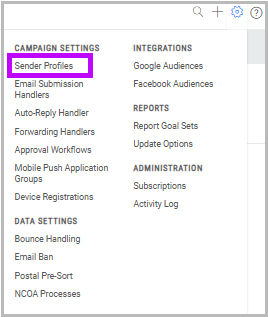
Navigate to Settings > Campaign Settings > Sender Profiles.
-
Select the relevant Sender Profile from the list.
-
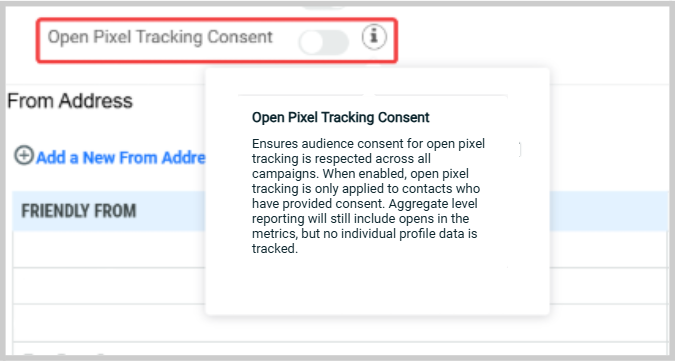
Turn On Open Pixel Tracking Consent.
- Enable the Open Pixel Tracking Consent toggle
If you need to create a new Sender Profile, contact your Zeta representative for assistance.
Step 3: Review current consent collection and sign-up/opt-out flows
Understand how you currently collect and manage audience consent across your systems.
Common methods include:
- Sign-up forms
- Preference centers
- Email opt-out/ unsubscribe mechanisms, such as unsubscribe links
Actions:
- Review forms, email headers and footers
- Existing preference pages
Step 4: Update data collection tools to collect consent
Update all systems used to collect and manage audience data collection methods to support open pixel tracking consent.
Common tools include:
- Web forms
- API posts
- Data imports
Required updates:
- Add the Open Pixel Tracking Consent field
- Allow consent to be both captured or withdrawn
- Ensure the field is correctly mapped in all data flows
- Create new forms if needed
Example: Updating web forms
-
Navigate to Production > Web Forms.
-
Select the form, then click Edit.
-
In Data File Mapping, locate Open Pixel Tracking Consent in Available Fields and move it to Mapped Fields. Alternatively, update the attached data map.
.png)
Apply similar updates to:
- API configurations
- Import processes
Step 5: Update sign-up flows and preference management to request consent
Ensure audiences can easily give and withdraw consent.
Common consent options
- Sign-up forms
- Preference centers
- Email opt-out experiences
See Recommendation 1, Recommendation 3 and Recommendation 5 for more details.
Suggestions:
-
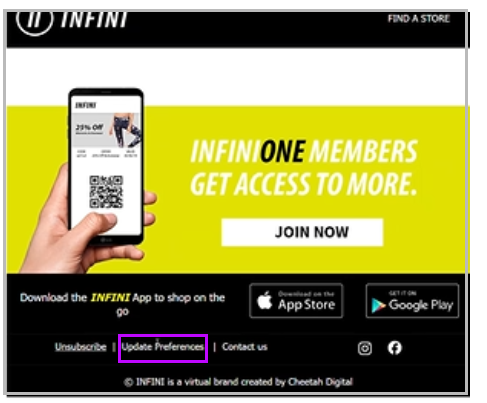
Update the existing Preferences link
-
If you use a general link, such as Update Preferences, add the Open Pixel Tracking Consent field to that experience
-
-
Create a dedicated consent link
- If you only offer Unsubscribe, add a separate option to opt out of open tracking specifically

See Recommendation 4 for more details.
Ensure your privacy messaging clearly explains:
- What open pixel tracking is
- How your organization uses tracking data
- How audiences can give or withdraw consent
Important:
- Open tracking consent should be separate from standard Subscribe/Unsubscribe preferences
- Ensure your messaging is visible, clear, and easy to access
Note: If you update campaign creatives for campaigns that are already running, you will need to use Pick Up Changes to apply the updates.
Cheetah Digital's consent management is designed to support granular consent by purpose and by brand, which are designated through different Sender Profiles.
Consent for open pixel tracking is by Sender Profile.
- Setting a consent status for a recipient in one Sender Profile does not automatically sync that recipient’s consent or non-consent status to another Sender Profile that has Open Pixel Tracking Consent turned on.
- It is recommended to request and collect open pixel tracking consent per Sender Profile, with the purpose of that Sender Profile clearly stated.
Example:
Email tracking preferences
I agree to the use of Open Tracking Pixels in emails:
☐ To receive offers that are relevant to my interests
☐ To flag deliverability issues on vital information about my account or orders.
If open pixel tracking consent needs to be synchronized across designated Sender Profiles because only one consent checkbox is presented to recipients, you must implement a process to synchronize consent status across the consent fields in one or more tables. You can do this by using exports and imports or another method that updates the relevant tables.
For example, you may need:
- Transaction and marketing Sender Profiles on the same table
- Transaction and marketing Sender Profiles on different tables
- The same Sender Profile on multiple tables
Additionally, Zeta Tech Services as a paid service has the ability to create a custom procedure for customers to handle consent syncing automatically across different Sender Profiles and tables.
Step 6: Test and validate
Before launching, confirm that the consent collection and tracking configuration works as expected.
Validate:
- Consent capture in all forms and data inputs
- Opt-out and preference update flows
- Campaigns behave correctly when consent is given or not given ( July 14, 2026 and after)
Also ensure:
- Messaging is clear and understandable to recipients
- Opt-out is easy to access and complete
Step 7: Collect Consent from your audience
Begin actively collecting consent using your updated data collection tools and consent flows.
- Send consent request campaigns. See Recommendation 2
- Direct recipients to updated forms or preference centers
Step 8: Handle missing consent
For those audiences who do not respond, specific handling is needed based on when they were added to your database.
Consent values
- 100 - Consent given
- 1500 - No consent
- Empty - Treated as consent
Audiences added before April 14, 2026 – consent can be assumed and the consent field can remain empty. Default platform behavior for unknown value is followed.
Audiences added on or after April 14, 2026- must be treated as no consent. And the steps below can be followed to populate their consent value to 1500.
-
Identify records with no consent value
- Filter audiences in regions requiring consent
- Select records where the consent field is empty
-
Export the segment
-
Consider scheduling this export and the import below to run daily, in case a recipient changes their location to one where consent is required - for example if they move from the United States (or other country where consent is not needed) to France (where consent is required) their empty field will need to change to 1500.
-
-
Import, if most of your audience is in a region requiring consent, you may choose to set the Data Map to default the preference field to a value of 1500 (No consent) on import so that all empty imported rows are automatically set to 1500. Otherwise you will need to follow these manual steps:
- Update consent values - Set all records from the filter to 1500 (No consent)
- Re-import updated data - Map the consent field to ensure values are applied correctly
Notes: New records of impacted recipients with no consent given must be imported with the value of 1500, to avoid opens being tracked without consent.
If the Data Map is set to default the preference field to 1500 (No consent), when importing audiences that are not in regions covered by the consent requirement (such as in the United States), you may wish to enter 100 in the preference field for those audiences that do not require consent, so that tracking will still occur in regions where it is permitted.
Step 9: Go live with open pixel tracking consent collected and enforced - on July 14, 2026 or after
Send campaigns with consent collected, sign-up or preference flows updated and open tracking enforced for targeted audiences.
Key takeaways
To move to a consent-based approach, you must:
- Collect explicit consent for open tracking
- Update all data collection points and user flows
- Ensure recipients can easily opt in or out
- Enforce consent strictly from July 14, 2026
Approach 2: Stop tracking for targeted audiences before consent collection is ready (recommended for faster compliance)
This approach allows you to more quickly align with compliance requirements by disabling tracking now and reintroducing it later once consent collection is in place (See Approach 1).
Step 1: Identify impacted audiences
Identify recipients located in regions where consent is required for email open pixel tracking.
Step 2: Enable Open Pixel Tracking Consent feature in existing Sender Profiles
Use Sender Profiles to manage open pixel tracking consent at the mailing domain level.
To enable Open Pixel Tracking Consent in existing Sender Profiles
-
Navigate to Settings > Campaign Settings > Sender Profiles.
-
Select the relevant Sender Profile from the list.
-
Turn On Open Pixel Tracking Consent.
- Enable the Open Pixel Tracking Consent toggle
If you need to create a new Sender Profile, contact your Zeta representative for assistance.
Step 3: Manually set “No Consent” for your audience
Use this approach if you do not plan to collect consent from your audience before July 14, 2026.
Actions:
- Update your audience data by setting the Open Pixel Tracking Consent field to 1500 (No Consent) for all relevant profiles
- Ensure the Open Pixel Tracking Consent field is properly mapped across your data sources, such as:
- Data imports
- API integrations
- Datamap configurations
Result: Open pixel tracking is disabled for these audiences, ensuring compliance without requiring active consent collection.
Step 4: Review current consent collection and sign-up/opt-out flows
Understand how you currently collect and manage audience consent across your systems.
Common methods include:
- Sign-up forms
- Preference centers
- Email opt-out/ unsubscribe mechanisms, such as unsubscribe links
Actions:
- Review forms, email headers and footers
- Existing preference pages
Step 5: Update your sign-up/opt-out flows with your ‘Do not Track Opens’ Policy
It is recommended to communicate your policy on open tracking so your audience understands how their data is handled.
Update your preference policy
Explain to your audience:
- What open pixel tracking is
- How your organization uses tracking data
- Your policy that opens are not tracked in email campaigns
- Do not provide an option to opt-in or opt-out of open pixel tracking. When you are ready to begin collecting consent to enable tracking, proceed to Approach 1
Important:
- Open tracking consent communications to audiences should be separate from standard Subscribe/Unsubscribe preferences
- Make your message visible, clear, and easy to access
Common placement
- Email headers and footers
- Areas where Unsubscribe or Preferences links are displayed
Suggestions
-
Add a new link: Create a dedicated link, such as Open Tracking Policy, that explains your consent approach.
-
Leverage existing preference links: If you already have a Preferences link, update it to include your open tracking policy and consent details
Note: If you update campaign creatives to already running campaigns, you will need to use Pick Up Changes to apply the updates.
Step 6: Test and validate
Confirm that open tracking is disabled and any policy updates are visible in the relevant sign-up, opt-out, or preference flows.
Validate and ensure that:
- No tracking is captured in all relevant profiles
- Policy updated in Sign-up/ Opt-out flows or Preferences
- Campaign behaves correctly with no consent given ( July 14, 2026 and after)
- Messaging is clear and understandable to recipients
Step 7: Go live with Open Pixel Tracking Policy updated and Open Tracking Disabled - on or before July 14, 2026
Send campaigns with updated Open pixel tracking consent policy communicated in all sign-up or preference flows and with open tracking disabled for targeted audiences.
Key takeaways
To stop tracking and align with compliance until consent collection is ready, you must:
- Disable open tracking by setting consent to 1500 (No Consent)
- Update your sign-up and preference experiences to reflect your Do Not Track Opens policy
- Do not offer open tracking opt-in or opt-out until you are ready to collect consent
- Transition to a consent-based approach when ready
Campaign-Level Open Pixel Tracking Options
After configuring Open Pixel Tracking Consent, additional options are available for individual campaigns based on your sending scenario.
Exempt a Campaign from Open Pixel Tracking Consent
Some campaigns may qualify for an exemption that allows email opens to be tracked without recipient consent.
To exempt a campaign:
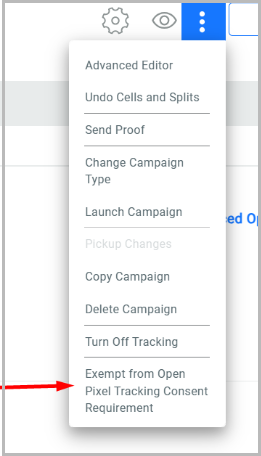
- Open the campaign.
- Select More Info.
- Select Exempt from Open Pixel Tracking Consent.
- Review the campaign details to confirm the campaign has been marked as exempt.
When a campaign is marked as exempt, open tracking is performed regardless of the recipient's Open Pixel Tracking Consent status.
Important: Only use this option when your organization has determined that the campaign qualifies for an applicable legal exemption.
Turn Off Open Pixel Tracking for Advanced Event Trigger Campaigns
Some Advanced Event Trigger (AET) campaigns do not include the recipient information needed to determine Open Pixel Tracking Consent.
If your Sender Profile has Open Pixel Tracking Consent enabled, the Turn Off Open Pixel Tracking option is available when configuring an Advanced Event Trigger campaign.
When selected:
- Open pixel tracking is disabled for the campaign.
- No open activity is recorded for recipients.
When not selected:
- The campaign uses the recipient's current Open Pixel Tracking Consent status or the consent value provided in the Advanced Event Trigger payload, when available.
Use this option for AET campaigns where recipient consent cannot be determined.
Recommendations on consent collection and management to comply with the data protection rules
Following recommendations are based on the CNIL regulations applicable in France.
Recommendation 1: Collect consent when the email address is collected (BEST practice)
This is the clearest method. How to do it (very concretely)
When a recipient enters their email address (signup form, account creation, newsletter form):
- Add a dedicated consent checkbox (not pre-checked)
- Explain clearly that tracking pixels will be used
- State the exact purposes
- Link to detailed information
example
☐ I agree that [Company name] may use tracking pixels in emails to:
measure email opening,
personalize content and sending frequency.
Learn more about email tracking (link to privacy / tracking policy)
Why this is compliant
- Consent is prior to tracking
- The recipient understands what will happen later
- The link between email address and tracking is explicit
Recommendation 2: If consent was NOT collected initially
This happens often with legacy databases. The absolute rule is that you cannot send a tracked email to ask for consent.
Correct execution (step by step)
Step 1 — Send a non-tracked email
- No tracking pixel
- No hidden tracking on images or links
- A campaign using the Do Not Track setting is advised
Step 2 — Include a secure consent link in the email
The link must:
- Be unique per recipient
- Lead to a page where the recipient takes positive action (click a button, etc.) to confirm their consent
Example email text
We would like your permission to use email tracking to improve our communications.
Manage my email tracking preferences
Because bots routinely click links in emails, we recommend that consent preferences always be collected in a form that the email links to, not directly from links in emails. Otherwise, a bot could click on the link in the email, likely to check for malware, and unintentionally change the consent value without the knowledge of the recipient. Consent requires an explicit action on the preferences page.
Step 3 — Consent page behavior
On the page:
- Explain the tracking purposes
- Require an explicit action (button click)
Example:
Email tracking preferences
☐ I agree to the use of tracking pixels in emails for:
campaign performance measurement
content personalization
[Accept] [Refuse]
When there is no response, this must signify refusal.
Recommendation 3: What information MUST be shown when asking for consent
Whenever consent is requested (form or page), the recipient must clearly understand:
Required information:
- Who places the tracking pixel
- What data is collected
- Date of open
- Browser and device type
- Approximate geographic location
- Why it is collected (specific purposes)
- That tracking applies to all devices used to read emails
Example wording:
We use tracking pixels to detect when you open our emails.
This allows us to personalize your experience, analyze performance, understand what devices our audience uses to improve usability, and provide offers that are relevant to our customers’ general regions.
Tracking applies regardless of the device used to read emails.
Recommendation 4: Consent must be specific (no “all-in-one” consent)
Do not use one checkbox to cover:
- Marketing
- Profiling
- Tracking
- Cross-channel targeting
Use separate consent for each purpose or clear grouping of closely related purposes only.
Recommendation 5: Refining your subscription process to include collection for region
Based on your organisation’s compliance strategy, you can collect consent for specific countries or regions, such as France for CNIL.
To do this, display the consent checkbox conditionally based on the selected country, as shown in the example below.
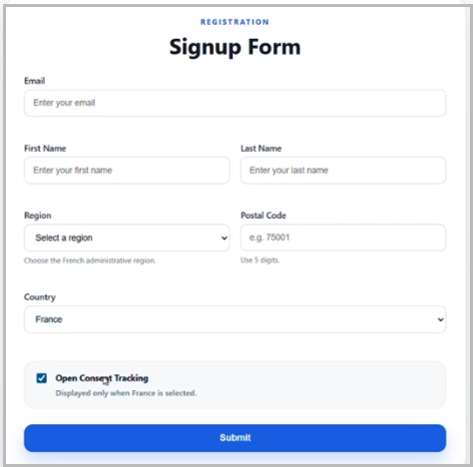
Once a recipient has self-identified their location, you can use dynamic content to display region-specific consent preferences. For example, recipients in the United States may see different consent options than those in France.
Recommendation 6: Store proof of consent
You must be able to demonstrate:
- Which email address gave consent
- When it happened
- How it was obtained
- For which purposes
The Cheetah Digital platform logs the date and time of consent.
Recommendation 7: Withdrawal of consent must be easy
Every tracked email should contain a footer link to manage email tracking preferences. The link must:
- Be unique per recipient
- NOT require the recipient to enter their email address again
When consent is withdrawn, tracking pixels must be disabled for future emails.
Measures must be taken to ensure that pixels in already-sent emails are also neutralised, so that no tracking occurs if the recipient re-opens them. Removal of this historical personalized open data for recipients who have withdrawn consent is a longer term goal that we will be working toward in Cheetah Digital, but will not be implemented before July 14, 2026 in our interim solution.
Note: The step to withdraw consent must be easy to find and understand, it must not be more difficult to withdraw consent than to provide consent.
Recommendation 8: Acknowledgement of withdrawal of consent
When a recipient changes their consent for Open Pixel Tracking to “no consent” (status 1500), you are required to send the recipient an untracked email confirming the change.
In Cheetah Digital, create a triggered email campaign that is sent to a recipient when they remove their consent. Use a text only email, or else the Cheetah Digital's “Do Not Track” feature for this campaign, as unlike other servicing emails, all tracking for this confirmation is prohibited under CNIL.
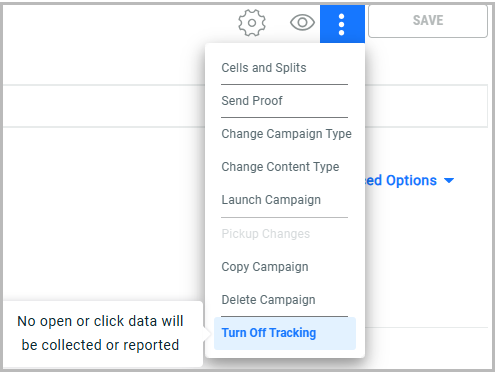
Use the campaign's Do Not Track setting for the acknowledgement of withdrawal of consent, as this email cannot be tracked in any way.
Recommendation 9: List clean-up of recipients who do not engage
To maintain deliverability, marketers should regularly review and remove recipients who are not engaging. When consent is not provided, open activity is not visible for email campaigns, which may reduce visibility into engagement, similar to the impact seen with Apple MPP.
Recommended approach
- Periodically identify recipients who have not provided consent for open tracking
- Exclude recipients who have shown engagement through clicks
For the remaining audience:
Send a message to confirm continued interest, for example:
- “We’d like to confirm that you’d like to continue receiving emails from us. Since we cannot track opens, we may not be able to see your engagement.
- Would you like to continue receiving emails? (Yes / No)
- Would you like to enable open tracking so we can better tailor our communications? (Yes / No)”
Next steps
- Remove recipients who indicate they no longer wish to receive emails
- Evaluate recipients who do not respond for potential list clean-up, considering additional signals such as:
- Recent purchases
- Website activity or logins
If appropriate, consider running a targeted re-engagement or win-back campaign to rebuild engagement with this audience.
You can also explore Cheetah Digital tools, such as Interactive Moments with Journeys, to support continued engagement with these recipients.
Coming Soon
How open pixel tracking consent impacts your reporting
At this time, if audiences have not given consent, their opens will not be tracked at an individual level OR at an aggregate level.
Coming soon will be aggregate level reporting, allowing you to see all open activity, with audiences whom have not given consent staying anonymous.