
Stored Procedures - Guidelines
Introduction
This document is not intended to teach how to write Stored Procedures but aimed at those already familiar with SQL that should observe recommended best practices when creating Stored Procedures for Selligent purposes.
Hence focus is on:
- Syntax, style and structure of SQL
- Typical situations in which SPs will be used
- Situations when SPs should be avoided
- Recommendations for structure and style when writing SPs
- Things to avoid when writing SPs
- Some example SPs for common use cases.
SQL Styles Rules
Following these rules when writing SQL ensures consistency and uniformity across Selligent toolsets, improving maintainability when code is amended by different developers. An added benefit is improved performance when cached plans are reused.
Upper casing of keywords
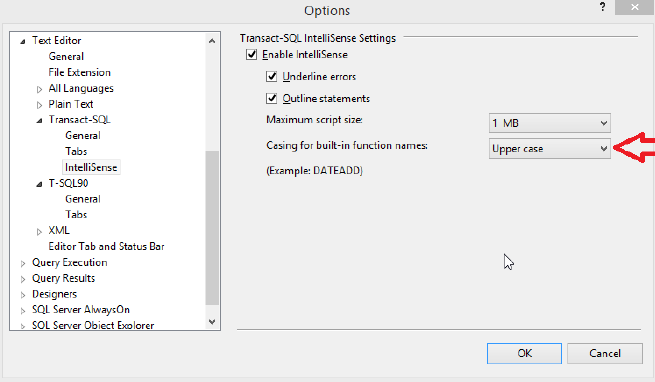
Always capitalize T-SQL keywords (SELECT, FROM, …) and built-in functions (COUNT, MAX, MIN, …). SSMS users can adjust IntelliSense settings for built-in functions
Naming conventions
Use a consistent naming scheme for tables. A common scheme is: TYPE _ENVIRONMENT where:
- ENVIRONMENT is to differentiate between test (_TST) and production (_PRD) for situations where a platform is used for both
- ‘TYPE’ depends on the object.
Table names
For lists created in the Selligent solution, a default naming prefix exists for the underlying tables:
- Audience List: USERS_
- Data List: DATA_
- Option Lists: OPTION_
- Data Selection Lists: ARTICLES_
- Device Lists: DEVICES_
It is recommended that additional tables follow a standard naming convention during creation, e.g.:
- Data Lists used for extended profiles (1-1) usually begin with: DATA_EXT_
- DataLoader tables: SYNC_
- DataExporter tables: EXP_
- Temporary tables (physical): TMP_
- Configuration tables: CFG_
Stored Procedures
When created in Selligent, all Stored Procedures begin with an ST_ prefix. Where possible it is encouraged to add further prefixes to help identify the purpose of the stored procedure:
- Dataloader: ST_SYNC_
- Dataexporter: ST_EXP_
- Processing scripts (e.g.: procedures called by the Job Agent for nightly processing of new data or aggregate calculations): ST_PROCESS_
- Report retrieval (e.g.: procedures linked to Reporting applications): ST_REPORT_
- Logging: ST_LOGGING_
Other objects
- PRIMARY KEYS: use the prefix PK_ (e.g.: PK_tablename for manually-created primary keys)
- FOREIGN KEYS: use the prefix FK_
- INDEXES:
- Use IDX_ as the prefix
- Use the key columns in the name of the index, e.g. an index on MAIL uses IDX_MAIL. For combined indexes, list all the key columns in the correct order.
- Add _INC if there are included columns
- Add _FILTERED if it is a filtered index
- Add _UNQ if it is a unique index
- CONSTRAINTS: DF_ as prefix (add _UNQ to indicate a unique constraint)
Schema qualified object names
Using schema-qualified object names avoids potential object mismatch by providing the database engine with information about which specific object to call, so will not presume the schema of the current logged-in user (SaaS accounts run under their own schema). For example, instead of:
SELECT name, mobile FROM USERS_CUSTOMERS;
Write:
SELECT name, mobile FROM dbo.USERS_CUSTOMERS;
An additional benefit is plan reuse, which avoids creating multiple plans for the same statement or batch to be executed by users with a different default schema.
Field naming conventions
There are plenty of articles written about the importance of appropriate and meaningful choices of field and object names (columns, stored procedures, parameters, etc). Names should be:
- Legal: names should begin with a letter and can only contain letters, numbers and underscores - no spaces. To avoid confusion, it is recommended to avoid using keywords as names. https://msdn.microsoft.com/en-us/library/ms189822.aspx has a list of keywords.
- Descriptive: the name should be indicative of its purpose. ADDRESS could refer to home, work, email, IP, MAC etc, so may need the table name to qualify it. Furthermore, it is encouraged to populate that column’s Description with annotation to clarify its purpose.
- Succinct: although the maximum length of a name is 64 characters, a longer and more descriptive name introduces a greater risk of mistyping and may be truncated in presentation. Brevity should be observed, but not at the expense of clarity.
- Independent of type: do not include the data type in the name. A column called REDEEMED is more obvious than BOOL_REDEEMED, and decoupling the type from the purpose permits the data type to be modified without having to update related references.
- List-contextual: columns have meaning appropriate to that list, so a POINTS profile extension can simply use ARCHERY and GOLF rather than ARCHERYPOINTS and GOLF_POINTS.
Aliases
When using Common Table Expressions or subqueries, choose meaningful alias names (rather than aliases of ‘a’, ‘t1’, etc) and ensure they are clear and obvious. For example, a table is called ‘USERS_CONTACTS_PROD’ could use an alias of ‘CONTACTS’.
The same applies for CTEs and subqueries: use descriptive text. For example, use PURCHASES if the tale represents all purchases.
Firstly, identify column aliases with the ‘AS’ syntax, e.g. use:
SELECT last_purchase_date AS lastbuy;Instead of:
SELECT last_purchase_date = lastbuy;Secondly, all references to table columns should then use any declared table aliases to make it clear which table the field belongs to. For example:
SELECT customers.id AS customer_identifier
, optin.value AS consent
FROM dbo.USERS_CUSTOMERS AS customers WITH (NOLOCK)
LEFT JOIN dbo.DATA_CUSTOMERS_OPTIN AS optin WITH (NOLOCK)
ON customers.id = optin.userid;
Table aliases are mandatory when statements incorporate more than one object. For statements featuring single object operations, aliases are still recommended to future-proof the statement for later expansion to include multiple objects.
Statement terminators
Future-proof statements with a statement terminator (;). Some current options (e.g.: Common Table Expressions) already require that the previous statement has been properly closed:
; WITH EXAMPLE_CTE (
SELECT customers.id AS userid
FROM dbo.USERS_CUSTOMERS customers
WHERE created_dt IS NOT NULL
)
SELECT USERID
FROM EXAMPLE_CTE
WHERE CREATED_DT > DATEADD(MONTH, -1, CURRENT_TIMESTAMP);
Joins
Do not use old-style join syntax (using the WHERE clause to perform a join). For example, instead of
SELECT USERS.MAIL, ORDERS.ORDERDATE
FROM dbo.USERS_CUSTOMERS USERS, dbo.DATA_ORDERS ORDERS
WHERE USERS.ID = ORDERS.USERID;
Instead, adhere to ANSI/ISO 1999 syntax with the following:
SELECT USERS.MAIL, ORDERS.ORDERDATE
FROM dbo.USERS_CUSTOMERS USERS WITH (NOLOCK) INNER JOIN dbo.DATA_ORDERS ORDERS WITH (NOLOCK)
ON USERS.ID = ORDERS.USERID;
Avoid keyword shortcuts
Using shorthand gives no performance gain and retards readability, so always use fully qualified keywords instead of shorthand equivalents, e.g.:
- In datetime functions, use DAY instead of 'DD'
- Write WEEKDAY instead of ‘DW’
- Use CREATE PROCEDURE instead of ‘CREATE PROC’
- Use BEGIN TRANSACTION instead of ‘BEGIN TRAN’
- Write INNER JOIN instead of just ‘JOIN’ - make all joins explicit
- Write WITH (NOLOCK) instead of just ‘(NOLOCK)’
SQL Data Types
Although all data types could be used within SQL routines (tasks, stored procedures, etc) only certain types are recognised by Selligent. Consequently, only use compatible data types in the situation where database fields are exposed to Selligent functionality (e.g.: a return value from a Stored Procedure or SQL Task).
The SQL data types used by Selligent are:
| MMP | MS-SQL Server type |
|---|---|
| Boolean | BIT |
| Numeric | INT |
| Long | BIGINT |
| Float | FLOAT |
| Date | DATE |
| DateTime | DATETIME |
| Text | NVARCHAR |
| LongText | NVARCHAR |
The types that can be safely exposed to Selligent are:
- INT, NVARCHAR, DATETIME, DATE, FLOAT and BIT
- NCHAR is permitted but with caveats:
- These fields are safe for PERSONALISATION purposes
- SELECTIONs against these data types adversely impacts SQL plans and introduces performance delays as the platform is unaware of those data types (so performs implicit converts during filtering)
Data types that should not be exposed to Selligent are:
- SMALLINT/TINYINT – the platform does not perform boundary-checking
- VARCHAR/CHAR/NCHAR are permitted but with caveats:
- These fields are safe for PERSONALISATION purposes
- SELECTIONs against these data types adversely impacts SQL plans and introduces performance delays as the platform is unaware of those data types (so performs implicit converts during filtering)
Data types that should be avoided are:
-
Deprecated data types (e.g.: NTEXT or TEXT)
Data width and constraints
Make field as narrow as possible, e.g.:
-
NUMERIC rather than LONG
-
TEXT rather than LONGTEXT Be accurate where possible about the length and data type of fields, for example: a field that will always be populated should be set to NOT NULL
Syntax formatting
These basic formatting rules improves readability of statements and thus assists with faster understanding and quick amendments:
- List each column on a new row
- Commas should be added at the beginning of a row and not at the end of a previous row (which permits commenting out specific elements more easily).
- Use spaces liberally: for example, add spaces before and after each comparison
- Use line breaks liberally: for example, add line breaks after each WHERE clause element, separate multiple statements with at least one blank line, etc
An example of a well-formatted statement would be:
SELECT customers.ID AS USERID
, promo.CODE
FROM dbo.USERS_CUSTOMERS customers WITH (NOLOCK)
INNER JOIN dbo.DATA_EXT_CUSTOMERS_PROMO promo
ON customers.ID = promo.USERID
WHERE EXISTS (
SELECT 1
FROM dbo.ACTION_CUSTOMERS_PROMO actionpromo
WHERE actionpromo.USERID = customer.ID
AND (
actionpromo.ACTIONCODE = 'NEWYEAR'
OR
actionpromo.EXEC_DT < DATEADD(DAY, -7, CURRENT_TIMESTAMP)
)
)
AND customers.[NAME] = 'Fireworks';
Permitted database objects in Selligent
There are particularly good reasons (mostly related to performance) not to use any of these database objects - by policy, Selligent only permits Stored Procedures.
By default, the Selligent solution does not provide any functionality to develop and test stored procedures, therefore it is advisable to use a local MS-SQL install for development and debugging work. Contact Zeta’s support for assistance in setting up a suitable environment.
Due to the risk that poor code presents to all organisations using that platform, management of stored procedures is restricted to those holding System admin privilege for that install.
Stored procedures must adhere to specific recommended Zeta practises, which include (but are not limited to):
- Naming – all Stored Procedures follow a standard naming convention
- Documentation – the procedure should be annotated with a standard header
- Variable and parameter declaration – definition and structure
- BEGIN / END blocks – denoting self-contained grouped statements
- TRY / CATCH blocks – handling errors gracefully
- OUTPUT and RAISERROR – return values and exit status
- Logging – recommended to use ST_LOGGING_SELLIGENT_ROUTINE
Naming convention
The name of the stored procedure should begin with ST_ and can contain only alphanumerical characters and an underscore (_). Attempting to use a name that differs from this convention will report an error and disable the SAVE icon.
Documentation header
Upon creation each stored procedure is furnished with a standard documentation header:
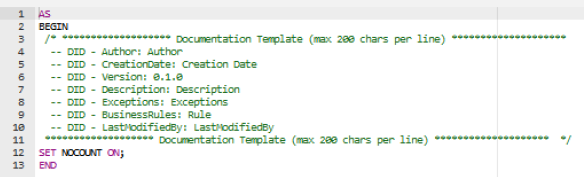
This information should not only be completed but also updated as amendments are made, bringing maintainability benefits such as:
- Identifying the procedure’s original author.
- Assisting new developers to quickly understand the purpose of the routine.
Lines beginning with a Data Integration Documentation identifier (-- DID -) are parsed using a custom SQL Server Management Studio script which captures information following each tag (header attribute). To avoid truncation, each line should not exceed 200 characters.
Tags serve to document and annotate code blocks, so may appear multiple times (with content concatenated by the script based on the order in which they appear) and can appear anywhere in the code. It is strongly recommended additional tags being placed closer to code blocks rather than collating everything in the header.
The following tags are recognized:
- Author — Specifies the code’s original author.
- CreationDate — Should contain the original date when the routine was created.
- Version — Indicates a X.Y.Z version number (format mentioned later)
- Description — Describe the purpose and goal of the routine (without reading the code)
- Exceptions — Description of the specific error(s) thrown. Use multiple lines (with tags) for multiple errors thrown.
- BusinessRules — Describe the functional purpose of the routine, i.e.: the overall goal to be achieved by this code. Additional business rules can be specified by repeating the ‘DID’ part; again, consider using this tag extensively to document distinct parts of the routine within the code itself rather than to try and explain everything in the header.
- LastModifiedBy — Identifies who last made amendments. It is recommended that this developer also annotates their changes accordingly closer to the code.
Variable and parameter declaration
Variables used in stored procedures should be defined at the top of the routine, providing a quick review of which are in use. Each variable should be placed on a new line with their datatype and length (even if optional) as length specification avoids the issue of silent truncation errors. In cases where a variable has a default value, explicitly specify this in the declarations.
For example:
DECLARE @NAME VARCHAR(50);
DECLARE @AGE INT;
DECLARE @NOW DATETIME = CURRENT_TIMESTAMP;
Parameters should also be treated in the same way:
- Properly aligned on a new line each with the coma separator at the front
- A data type and length explicitly defined and all properly aligned.
- Provide default values for all parameters and align them for easy review.
Any output parameters should be placed at the end of the list. For example:
CREATE PROCEDURE dbo.ST_SYNC_MYDATALOADER
@FILENAME NVARCHAR(500)
, @CAMPAIGNID INT = NULL
, @RESULT INT = NULL
, @INSERT INT OUTPUT
, @UPDATE INT OUTPUT
, @REJECT INT OUTPUT
, @MSG NVARCHAR(4000) OUTPUT
Try/Catch blocks
Some SQL errors will not halt procedure execution and continue to cause more widespread damage with further processing, for example: a variable specified a data type of INT but is assigned a BIGINT value - an error will be logged but the variable will contain the value NULL.
For that reason, always use TRY / CATCH blocks to stop the routine upon encountering an error so that the error can be gracefully handled. For example:
DECLARE @LOG NVARCHAR(4000);
BEGIN TRY
-- === write procedure logic here ===
DECLARE @NUMBER INT;
-- !!! Oops, Arithmetic overflow error !!!
SET @NUMBER = 4654651321564163131;
END TRY
BEGIN CATCH
DECLARE @ERROR_MSG NVARCHAR(2000);
DECLARE @ERROR_SEVERITY INT;
DECLARE @ERROR_STATE INT;
-- get all error information
SET @ERROR_MSG = ERROR_MESSAGE();
SET @ERROR_SEVERITY = ERROR_SEVERITY();
SET @ERROR_STATE = ERROR_STATE();
-- log the error first
SET @LOG = '{"event_type":"ERROR","MSG":"' + @ERROR_MSG + '"}';
EXEC [ST_LOGGING_SELLIGENT_ROUTINE] @LOG, @@PROCID;
-- then throw error back up
RAISERROR(@ERROR_MSG, @ERROR_SEVERITY, @ERROR_STATE);
END CATCH
Output, Return and Raiserror
Use the RETURN and OUTPUT options in stored procedures correctly:
- OUTPUT – use this parameter to identify data returned from a procedure
- RETURN – only use this to provide status information, e.g.: ERROR_NUMBER() / @@ERROR.
- RAISERROR – use this function (instead of using the return value of the processor) to raise errors. It is better to use CATCH to trap the error so it can be logged, then RAISERROR to handle it gracefully.
More information can be found at:
https://docs.microsoft.com/en-us/sql/t-sql/language-elements/raiserror-transact-sql
For Tasks in Selligent, note that:
- OUTPUT parameters can be used in the next task stage
- RETURN values can be used to determine if the procedure fails or not
- A hard error in the procedure will make the task fail; RAISERROR will show that exact message.
For Custom Components that use Stored Procedures:
- OUTPUT parameters can be scoped and used further in the journey
- RETURN values can also be fetched and used further in the journey
- A hard error in the procedure will be exposed to the journey, causing that to fail as well (with a default error message).
Logging
Selligent provides ST_LOGGING_SELLIGENT_ROUTINE, a logging framework which writes logging information to the LOG_SELLIGENT_ROUTINES table. Typical examples of usage from within a stored procedure include:
EXEC dbo.[ST_LOGGING_SELLIGENT_ROUTINE] 'THIS IS A LOG TEST', @@PROCID
SET @MSG = '{"event_type":"ERROR","MSG":"' + ERROR_MESSAGE() + '"}';
EXEC dbo.[ST_LOGGING_SELLIGENT_ROUTINE] @MSG, @@PROCID
A simple Stored Procedure should illustrate how logging is performed, for example:
CREATE PROCEDURE dbo.ST_ProofOfConcept
AS
BEGIN
/* ****** Documentation Template (max 200 chars per line) ************
-- DID - Author: John Doe
-- DID - CreationDate: Today
-- DID - Version: 0.1.0
-- DID - Description: A proof-of-concept to test logging routines
-- DID - Exceptions: Exceptional
-- DID - BusinessRules: TwelveInch Rule
-- DID - LastModifiedBy: ChangedByThem
********* Documentation Template (max 200 chars per line) ******** */
SET NOCOUNT ON;
-- writes 'This is a Log Test' into LOG_SELLIGENT_ROUTINES:
EXEC [ST_LOGGING_SELLIGENT_ROUTINE] 'This is a Log Test', @@PROCID
END;
Invocation
If possible (from Campaign) invoke the stored procedure with:
EXEC [ST_ProofOfConcept] From Selligent, this will require an SQL task containing this Stored Procedure, or a Custom Component using this stored procedure added to a custom journey which can be invoked manually.
Checking logs
The LOG_SELLIGENT_ROUTINES table can then be queried using a routine like:
SELECT TOP 1000 L.ID
, L.SESSIONID
, OBJECT_NAME(L.PROC_OBJECTID) AS 'PROC_OBJECTNAME'
, L.EVENTTYPE
, CONVERT(DATETIME2(0),L.EVENTDT) AS 'EVENTDT'
, OA.CALLSTACK
, CONVERT(NVARCHAR(MAX), DECOMPRESS(L.[LOG])) AS 'LOGMSG'
FROM DBO.LOG_SELLIGENT_ROUTINES AS L WITH (NOLOCK)
OUTER APPLY
(
SELECT (STUFF(( SELECT '>' + CONVERT(NVARCHAR(256),
ISNULL(OBJECT_NAME(TRY_CONVERT(INT, S.[VALUE])),'')) AS [text()]
FROM string_split(L.CALL_STACK,'|') S
FOR XML PATH ,TYPE).value('.[1]','nvarchar(max)') , 1, 2, '')
)
) OA(CALLSTACK)
WHERE 1 = 1
-- specify the name of the Stored Procedure here:
AND OBJECT_NAME(L.PROC_OBJECTID) = 'ST_ProofOfConcept'
ORDER BY L.ID DESC
Those with access to Campaign may use the SQL Pane to conduct such a query. As this feature does not yet exist in Selligent, the only way to surface this information is:
- Create a Data Selection List containing a text field sufficiently large to contain the logging information
- Create a Stored Procedure that queries the DBO.LOG_SELLIGENT_ROUTINES table then inserts relevant data into that Data Selection List
- Create a Custom Component that calls this Stored Procedure
- Create a page with a Data Selection that uses the Data Selection List as a data source
- Add a repeater to the page to surface this information
- Create a Custom Journey that calls the Custom Component (to populate the Data Selection List) then uses this page to display rows of logging information.
An alternative approach is to use an EXPORT TASK to export the logging information to a separate file for analysis, but this may not be a more time-effective method than the journey to expose the information.
Writing T-SQL statements
The following section describes several guidelines to follow when creating T-SQL statements. These provide some best practices on how to use specific options and which methods are best suited in which case.
Cursors
Avoid at all costs; they are unnecessary for 99% of cases and cause overhead.
With (Nolock)
Add this clause to queries (SELECT statements) to ensure table locking is reduced.
Bear in mind this still allows dirty reads (meaning uncommitted data can be returned by this hint). Hence, omit this hint for situations when updated values must be retrieved.
Select into
This is a common approach to copy data from one table to a new one – but only data is copied: constraints, indexes and keys will not be duplicated. Consequently, it is advised to create the table first with the correct structure then use ‘INSERT INTO’ to copy data over.
Similarly, it is wasteful to use ‘SELECT * INTO’ to duplicate all fields when only a few are required: be economical with data retrievals!
Search arguments
Always use proper search arguments as predicates in queries, which benefits plan creation and performance:
- Do not use manipulations (functions) on columns in the WHERE clause
- Do not use wildcard matches at the start of a string compare (e.g.: avoid LIKE '%.com').
- Make use of variables (e.g.: today’s date) for better plan caching.
- Parameterize values rather than CONCAT
- Use QUOTENAME to prevent possible SQL injection errors
Update
When using the UPDATE statement, ensure:
- Use a WHERE clause to modify only specific rows
- When working on intermediate result sets, there can be performance gains by creating a new table then inserting records rather than updating an intermediate table.
Delete
Avoid DELETE statements when manipulating data through ‘temporary’ or ‘real’ tables; I/O overhead and fragmentation means benefits of using smaller intermediate tables are lost.
Ensure the initial selection considers the proper filters directly or insert the result set into a new temporary table.
Merge
Although a powerful way to upsert data, the equivalent UPDATE/INSERT/DELETE may still run faster – in most cases, it is better to use UPDATE and INSERT operations instead. However if MERGE is to be used, consider the following points:
- The source table has proper datatypes - avoid NVARCHAR(MAX) types.
- The target selection should be proper, so only the fields needed for the MERGE
- The join predicate between the TARGET and SOURCE table should be based on indexed fields, preferably UNIQUE indexes or PRIMARY KEYs – else SQLServer will not be able to generate a fast SQL execution plan.
- Any transformation of data must be done in the USING clause for the SOURCE selection.
- The data width of the target selection should not exceed the SQL server 8060 bytes block limit, else spills and table spools for the selection with MERGE will slow down performance significantly.
- NEVER add extra constraints in the WHEN MATCHED or WHEN NOT MATCHED clause of the MERGE – this causes the MERGE statement to treat the results like a cursor, degrading performance.
MERGE dbo.USERS_CUSTOMERS AS TARGET
USING (SELECT MAIL, [NAME]
FROM SYNC_USERS_CUSTOMERS WITH (NOLOCK) WHERE MAIL IS NOT NULL) AS SOURCE
ON (TARGET.MAIL = SOURCE.MAIL)
--When records are matched, update the records if there is any change
WHEN MATCHED
THEN UPDATE SET TARGET.MAIL = SOURCE.MAIL ,
TARGET.CREATED_DT = CURRENT_TIMESTAMP
--When no records are matched, insert the incoming records from source table to target table
WHEN NOT MATCHED
THEN INSERT (MAIL, [NAME]) VALUES (SOURCE.MAIL, SOURCE.[NAME]);
Dynamic SQL
Dynamic SQL plans cannot be cached, so they cause a recompile of the SQL execution plan for each invocation – cached plans are better for performance. However, if Dynamic SQL is needed, adhere to the following practice:
-
Always invoke the dynamic SQL through the following syntax: EXEC SP_EXECUTESQL …
-
All parameters should be provided using variables passed to the ‘SP_EXECUTESQL’ syntax: EXEC SP_EXECUTESQL @SQL, N’@VALUE INT’, @VALUE = @VALUE; So no concatenation of the SQL string just to add a value.
-
If concatenation is needed for column names or table names, use the ‘QUOTENAME’ function to mitigate the risk of erroneous SQL, for example:
SET @SQL = 'SELECT @MINID = MIN(ID)
FROM dbo.' + QUOTENAME(@TABLENAME) + ' WITH(NOLOCK)';
CTE
Common Table Expressions have their benefits, such as:
- Improves readability and maintainability
- Provides recursive programming via self-referring tables – e.g.: queries walking itself via self-joins
- Quickly narrowing down data used with windowing functions (ROW_NUMBER, RANK, …), to calculate rolling averages
However, a CTE will not persist or pre-calculate any data; although it provides similar functionality to a view, the definition is nor stored in metadata so the SQL engine re-executes the same code each time it is used. If a CTE is to be referenced multiple times in the same statement, consider instead intermediate (temporary) tables to hold results, which can be optimized for multiple uses.
Computed columns
The two approaches are:
-
Non-persisted — the value is not stored but calculated at the moment of retrieval (I.e.: evaluated as late as possible).
-
Persisted — the value is calculated during a data change, then stored in the table (i.e.: evaluated as early as possible). Due to the additional performance overhead required by non-persisted, this approach is preferred.
Computed columns cause an overhead when manipulating data but can simplify queries, even removing the need for Views. Consider the following situation, in which a filter on email domain names takes the form of LIKE comparisons in a segment, or specific RIGHT/SUBSTRING operations - meaning a performance overhead each time a segment is executed as the comparison or string operation is unnecessarily repeated.
An alternative approach is to make a persisted computed column, for example taking the domain part of an email address:
ALTER TABLE dbo.users_vouchers
ADD domain AS RIGHT(mail, CHARINDEX('@', REVERSE(mail))-1) PERSISTED;
In this situation, the domain is determined when the MAIL address is created (or altered), performing the string splitting operation once up-front – so that the value is available for successive queries and comparison operations. This approach means the initial overhead of a single additional write operation is a worthwhile investment to save time for frequent read operations in future. Note also that adding an index to a computed column makes it persisted.
Note that this computed field (DOMAIN) can even be indexed or included in an index, but the amount of expected read and write operations should justify the use of computed columns. Review the data model and typical business use of the data carefully to justify this approach.
Temporary tables / Table variables
Temporary Tables are best avoided where possible, as they are stored in TempDB which is heavily used by the platform as well as shared by many customers on one instance – so overuse of TempDB incurs a performance hit with a wide area of impact.
Table Variables are treated as Temporary Tables but SQL Server will always return an estimated row count of one record, and suffer from the same consequences as Temporary Tables - so best avoided for the reasons mentioned earlier.
Stored procedures for tasks
Every main type of task (SQL, IMPORT, EXPORT) for ETL processing requires a stored procedure at the core of its setup:
-
For an EXPORT TASK (extract) the stored procedure will be a query that defines the dataset to export.
-
For an IMPORT TASK (load), the stored procedure migrates newly-imported data from a source staging table to the destination production table.
-
For an SQL TASK (transformation), the stored procedure will process already-existing data to modify it according to business objectives.
Example export code
For a simple example, this procedure summarizes the number of contacts per language to give an idea of audience list demographics:
CREATE PROCEDURE ST_show_languages
@resultCode INT OUTPUT -- OUTPUT parameter = what's sent out
AS
BEGIN
/* ******************* Documentation Template (max 200 chars per line) ********************
-- DID - Author: Dave
-- DID - CreationDate: 2019-07-23
-- DID - Version: 0.1.0
-- DID - Description: Just used to group and total by language
-- DID - Exceptions: Exceptional
-- DID - BusinessRules: RulerOfBusiness
-- DID - LastModifiedBy: LastModifiedBy
******************* Documentation Template (max 200 chars per line) ******************** */
SET NOCOUNT ON;
SET @resultCode = 99; -- don't default to automatic success
BEGIN TRY -- try to query the audience list here
SELECT language, count(*) AS total
FROM users_newsletter_contacts
WHERE optout = 0
GROUP BY language
ORDER BY total DESC;
SET @resultCode = 0; -- success!
END TRY;
-- +++ OUCH! Something's gone wrong! +++
BEGIN CATCH
SET @resultCode = 4; -- SQL error somewhere
END CATCH;
-- report the results:
RETURN @resultCode;
END
Example import code
This is used for a data loader in which SYNC_IMPORT_TABLE is the list holding the newly-imported data, used to update both an audience list (USERS_CUSTOMERS) and a profile extension (DATA_EXT_ADDRESS) off that list.
CREATE PROCEDURE ST_SYNC_DataLoaderExample @FILENAME NVARCHAR(500) ,
@INSERT INT OUTPUT ,
@UPDATE INT OUTPUT ,
@REJECT INT OUTPUT ,
@MSG NVARCHAR(4000) OUTPUT AS BEGIN
/* ******************* Documentation Template (max 200 chars per line) ******************** --
DID - Author: Author --
DID - CreationDate: Creation Date --
DID - Version: 0.1.0 --
DID - Description: Description --
DID - Exceptions: Exceptions --
DID - BusinessRules: Rule --
DID - LastModifiedBy: LastModifiedBy
******************* Documentation Template (max 200 chars per line) ******************** */
SET NOCOUNT ON;
DECLARE @LOG NVARCHAR(4000);
BEGIN TRY
SET @INSERT = 0;
SET @UPDATE = 0;
SET @REJECT = 0;
SET @MSG = '';
SET @LOG = 'File [' + @FILENAME + '] is being processed.';
EXEC [ST_LOGGING_SELLIGENT_ROUTINE] @LOG, @@PROCID;
-- Create matching table
IF OBJECT_ID('TEMPDB..#MATCH') IS NOT NULL
BEGIN;
DROP TABLE #MATCH;
END;
CREATE TABLE #MATCH(
SYNCID INT NOT NULL ,
USERID INT NOT NULL ,
PRIMARY KEY (SYNCID, USERID)
-- Both fields as not just the audience list will be updated
);
-- Add existing matches on audience list to matching table
INSERT INTO #MATCH(SYNCID, USERID)
SELECT SYNC.ID, USERS.ID
FROM dbo.SYNC_IMPORT_TABLE SYNC
INNER JOIN dbo.USERS_CUSTOMERS USERS WITH (NOLOCK)
ON USERS.MAIL = SYNC.MAIL ;
-- AUDIENCE LIST: Add new records if it does not yet exist and output to matching table
MERGE INTO dbo.USERS_CUSTOMERS TARGET
USING dbo.SYNC_IMPORT_TABLE SYNC
ON SYNC.MAIL = TARGET.MAIL
WHEN NOT MATCHED
THEN INSERT (MAIL, CREATED_DT)
VALUES (SYNC.MAIL, CURRENT_TIMESTAMP)
OUTPUT SYNC.ID, INSERTED.ID
INTO #MATCH (SYNCID, USERID);
-- === PROFILE EXTENSION: Update existing records ===
UPDATE ADR
SET STREET = SYNC.STREET , HOUSENUMBER = SYNC.HOUSENUMBER , CITY = SYNC.CITY
FROM DATA_EXT_ADDRESS ADR
INNER JOIN #MATCH MAT
ON ADR.USERID = MAT.USERID
INNER JOIN dbo.SYNC_IMPORT_TABLE SYNC
ON MAT.SYNCID = SYNC.ID
;
-- === PROFILE EXTENSION: Insert new records ===
INSERT INTO dbo.DATA_EXT_ADDRESS (STREET, HOUSENUMBER, CITY, USERID)
SELECT SYNC.STREET, SYNC.HOUSENUMBER, SYNC.CITY, MAT.USERID
FROM dbo.SYNC_IMPORT_TABLE SYNC
INNER JOIN #MATCH MAT
ON SYNC.ID = MAT.SYNCID
WHERE NOT EXISTS (
SELECT 1 FROM dbo.DATA_EXT_ADDRESS ADR WITH (NOLOCK)
WHERE ADR.USERID = MAT.USERID
);
END TRY
BEGIN CATCH
DECLARE @ERROR_MSG NVARCHAR(2000);
DECLARE @ERROR_SEVERITY INT;
DECLARE @ERROR_STATE INT;
SET @ERROR_MSG = ERROR_MESSAGE();
SET @ERROR_SEVERITY = ERROR_SEVERITY();
SET @ERROR_STATE = ERROR_STATE();
SET @LOG = '{"event_type":"ERROR","MSG":"' + ERROR_MESSAGE() + '"}';
EXEC [ST_LOGGING_SELLIGENT_ROUTINE] @LOG, @@PROCID;
RAISERROR(@ERROR_MSG, @ERROR_SEVERITY, @ERROR_STATE);
END CATCH;
END;
Example SQL tasks
Some internal manipulation, but how this is then added to a task, I.e.: create the SPs, then create a task and drag it onto the canvas with success/fail paths.
ALTER PROCEDURE ST_SQL_INT_FORMATION_EX1_SP1 (@ERROR INT OUTPUT, @EXEC_DT NVARCHAR(50) OUTPUT, @OMSG NVARCHAR(4000) OUTPUT)
AS
BEGIN
SET NOCOUNT ON;
SET @ERROR = 0
SET @EXEC_DT = CONVERT(NVARCHAR,GETDATE(),111)
SET @OMSG = 'The procedure SQL_INT_FORMATION_EX1_SP1 was started at ' + CONVERT(NVARCHAR,@EXEC_DT)
SET @OMSG = ISNULL(@OMSG,'') + 'The procedure SQL_INT_FORMATION_EX1_SP1 ended at '+
CONVERT(NVARCHAR,GETDATE(),111) + ' AND HAS RETURN VALUE ' + CONVERT(NVARCHAR,ISNULL(@@ERROR,0))
SET @ERROR = @ERROR + ISNULL(@@ERROR,0)
RETURN @ERROR
END
Reporting journey based metrics
SELECT METRICS.CAMPAIGNID, METRICS.ACTIONID, CAMP.[NAME], MAIL.[NAME] ,
METRICS.TARGETCOUNT, METRICS.DELIVERYCOUNT, METRICS.BOUNCECOUNT
FROM CAMPAIGNS CAMP WITH (NOLOCK)
INNER JOIN SIM_REPORTING_FLOWMETRICS METRICS WITH (NOLOCK)
ON CAMP.ID = METRICS.CAMPAIGNID
INNER JOIN CAMPAIGN_ACTIONS ACTIONS WITH (NOLOCK)
ON METRICS.ACTIONID = ACTIONS.ACTIONID AND METRICS.CAMPAIGNID = ACTIONS.CAMPAIGNID
INNER JOIN MAILS MAIL WITH (NOLOCK)
ON MAIL.ID = ACTIONS.MAILID
WHERE CAMP.CREATED_DT < DATEADD(MONTH, -1, CURRENT_TIMESTAMP);
Transactional journey feed
One common use for SQL TASKS is to preload an (ARTICLE) list with pending communications then trigger a Transactional Journey to process those records. This is a preferable approach to trigger a mass-mail by batch-processing all the records first then triggering the journey once, rather than triggering the journey with numerous API calls.
ALTER PROCEDURE ST_SQL_TRG_TRAN_RECEIPT_JOURNEY
AS
BEGIN
/* ******************* Documentation Template (max 200 chars per line) ********************
-- DID - Author: Author --
DID - CreationDate: Creation Date --
DID - Version: 0.1.0 --
DID - Description: Description --
DID - Exceptions: Exceptions --
DID - BusinessRules: Rule --
DID - LastModifiedBy: LastModifiedBy ******************* Documentation Template (max 200 chars per line) ******************** */
SET NOCOUNT ON;
;WITH LATEST_ORDERS ([USERID],[ORDERID],[ORDERCODE],[RN]) AS
(
SELECT [USERID]
, [ID] AS [ORDERID]
, [ORDERCODE]
, ROW_NUMBER() OVER (PARTITION BY [USERID] ORDER BY [ORDER_DATE] DESC) AS RN
FROM DBO.[DATA_ACA_DATA_RETAILER_ORDERS] ORD
)
-- === this is ACTION_AL_TX_[orgIDstring]_[JourneyID] ...
-- e.g.: the 32-character organisation of abcd1234-dead-beef-9999-ab12cd34ef56
-- and FlowID of 9876 (read from the journey properties) makes
-- "abcd1234deadbeef9999ab12cd34ef56_9876"
INSERT INTO [ACTION_AL_TX_abcd1234deadbeef9999ab12cd34ef56_9876]
(USERID,ACTIONCODE,CONTENTDATA,TXARRAYFIELD1)
SELECT
U.[ID]
, 'RECEIPT' AS ACTIONCODE
, '{"ORDERCODE":"' + [ORDERCODE] + '"}' AS CONTENTDATA
, '[{' +
( SELECT STUFF((
SELECT
'{ "ID":"' + CONVERT(NVARCHAR(100),ISNULL(OL.ID,'')) +
'","PARAM":"RECEIPT","CONTENT":{"ORDERCODE":"' +
CONVERT(NVARCHAR(100),ISNULL(O.ORDERCODE,'')) +
'","ORDER_LINE_TOTAL":"' + CONVERT(NVARCHAR(100),ISNULL(OL.TOTAL_PRICE,'')) +
'","PRODUCT_ID":"' + CONVERT(NVARCHAR(100),ISNULL(OL.PRODUCTID,'')) +
'","AMOUNT_PRODUCTS":"' + CONVERT(NVARCHAR(100),ISNULL(OL.AMOUNT,'')) +
'","PRODUCT_NAME":"' + CONVERT(NVARCHAR(100),ISNULL(PROD.[PRODUCTNAME],'') ) +
'","PRODUCT_DESCRIPTION":"' + CONVERT(NVARCHAR(100),ISNULL(PROD.[PRODUCTDESCRIPTION] ,'') ) +
'"}},'
FROM DBO.[DATA_ACA_DATA_RETAILER_ORDERS] O
INNER JOIN DBO.[DATA_ACA_RETAILER_ORDERLINES] OL ON O.[ID] = OL.[ORDERID]
INNER JOIN DBO.[DATA_ACA_RETAILER_PRODUCTS] PROD ON PROD.[ID] = OL.[PRODUCTID]
WHERE LORD.ORDERID = O.ID
FOR XML PATH ('')), 1, 1, '')) + ']'
FROM dbo.[USERS_ACA_USR_RETAILER] U
INNER JOIN LATEST_ORDERS LORD
ON LORD.[USERID] = U.[ID] AND LORD.[RN] = 1
WHERE U.TESTUSER = 1;
END
Raising custom events
Inserting records into a Scheduled Custom Event is a useful method used to drive notifications – all that is needed is the underlying table name which can be found in the Advanced Settings of the event queue's properties itself:
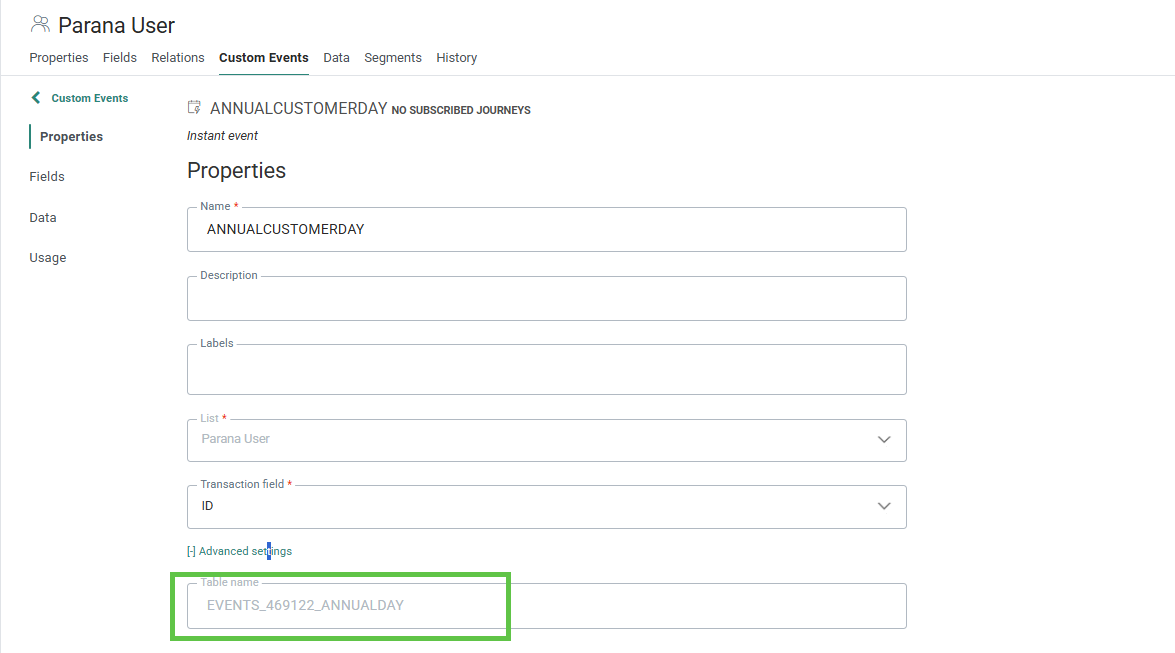
For example, a Bounce Stored Procedure to notify someone that an OPTOUT has taken place due to the mail quality settings:
ALTER PROCEDURE ST_exampleBounceNotification
@LISTID INT,
@USERID INT,
@EMAIL NVARCHAR(255),
@BOUNCE_THRESHOLD_REASON NVARCHAR(50),
@INQUEUEID BIGINT = -1,
@STATE INT = -1
AS
BEGIN
/* ******************* Documentation Template (max 200 chars per line) ********************
-- DID - Author: Dave
-- DID - CreationDate: Back in 2019
-- DID - Version: 0.1.0
-- DID - Description: Responds to an optout bounce by raising a custom event
-- DID - Exceptions:
-- DID - BusinessRules: Note the Custom Event needs to be created first
-- DID - LastModifiedBy: LastModifiedBy
******************* Documentation Template (max 200 chars per line) ******************** */
SET NOCOUNT ON;
-- ==== let's try to inject the record here ============
BEGIN TRANSACTION;
BEGIN TRY
INSERT INTO EVENTS_469122_ANNUALDAY
/* Custom Event tablename */
(
user_id,
created_dt,
bounced_address,
/* what address bounced? */
bounce_reason /* what was the given reason? */
)
VALUES
(
1, /* inform person 1 in MANAGERS list */
getdate(), /* today's date/time */
@EMAIL, /* bad email */
@BOUNCE_THRESHOLD_REASON /* bounce reason */
)
END TRY
BEGIN CATCH
SELECT ERROR_MESSAGE() AS ErrorMessage;
ROLLBACK TRANSACTION;
END CATCH;
COMMIT TRANSACTION;
ENDNote: This Stored Procedure presumes there is a Journey that responds to events being raised, so will send a notification to whomever has MASTER.ID = 1 in the MANAGERS audience list.