
Create a Retargeting Journey
A follow-up message could
be an email thanking them and stating all the advantages they now have after accepting the offer.
And a retargeting message
could be an email convincing them of the benefits of this great offer.
(See Offers,Follow up and retargeting for information on how these journeys are used in Site.)
To set up the retargeting process in Selligent you need to sSetup and publish a Custom Journey with a Retargeting Event component
In this example we use an email, but it can also be a mobile message or SMS.
Setup and publish a Custom Journey with a Retargeting Event component
This needs to be done to set up a retargeting process in Selligent :
1. Create a Custom Journey.
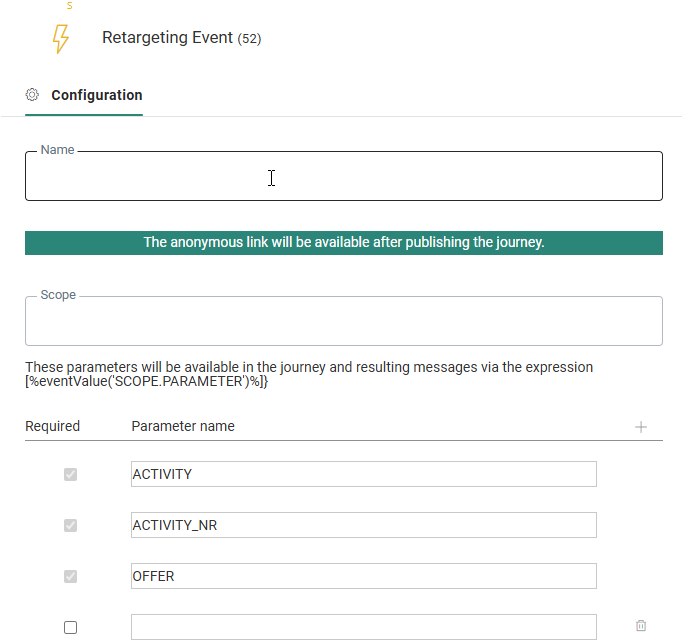
2. Add an Retargeting Event componentand specify its parameters.
- three read-only system parameters are added automatically, containing values from Site:
- ACTIVITY— the activity name
- ACTIVITY_NR— the position of the activity in the activity list in Site (the position in the funnel)
- OFFER— contains the public name of the offer that made the call
-
a 'Scope' is required. That way, the expression '[%eventValue('SCOPE.PARAMETER')%]' can be used throughout the Journey to call the parameters.
Supported locations for this expression are content (emails, pages, mobile messages) and data components.
The User lookup and Split components do not support the event parameters yet.
3. Add an Email component and select the correct retargeting email to be sent (or other interaction such as an SMS/mobile message).
4. Publish the Custom Journey.
Always give your retargeting journeys and event parameters easily recognizable, descriptive names. They are used in Site’s offer settings.