
Modify User Group Access
User Groups grant access to one or more Business Units within one or more applications. Optionally you can modify the access granted by a User Group.
If you add access to a Business Unit and / or application, all users currently in the User Group will be granted that access. Likewise, if you remove access from a Business Unit and / or application, all users currently in the User Group will lose that access.
Note: This feature is available for Organization Administrators.
To modify the access granted by a User Group:
-
Log into the Zeta Login User Workspace.
-
Click your profile icon in the top-right corner of the screen. The Profile Info pop-up window is displayed.
-
Within the Profile Info pop-up window, click Zeta Login Administration. This will take you to the Zeta Login Administration environment, with the Users tab selected by default.
-
Select the User Groups tab. This tab displays all currently defined User Groups.
-
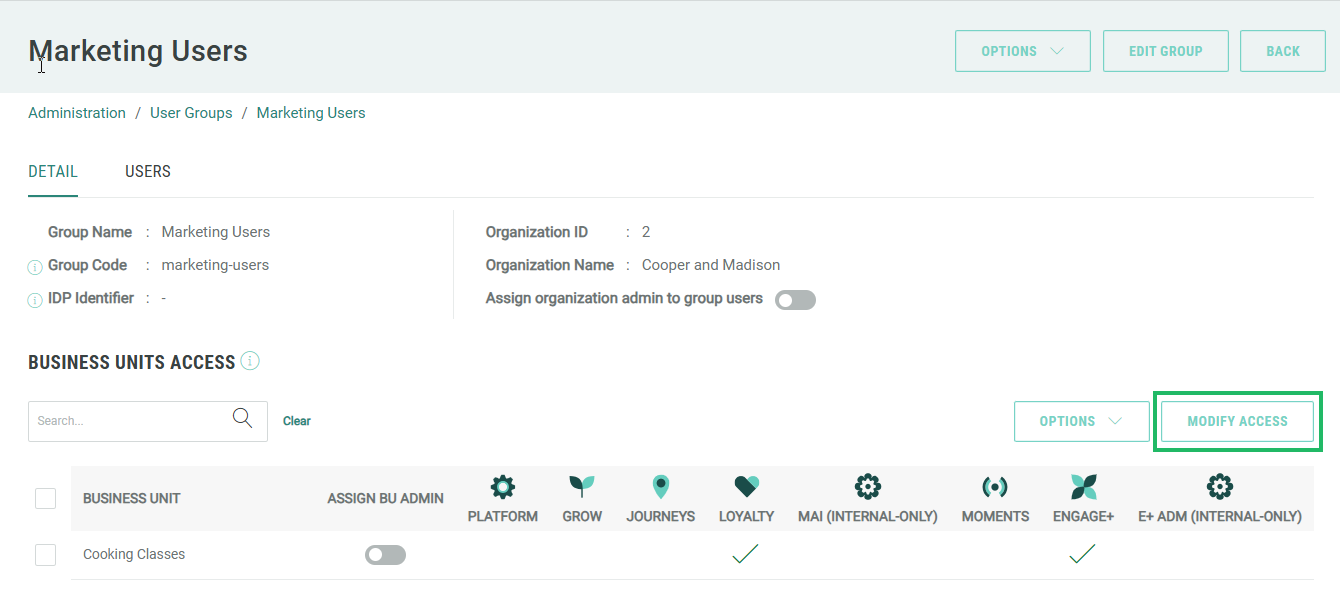
Click the desired User Group. The User Group Details screen is displayed with the Detail tab selected by default. This tab displays a grid showing the Business Units / applications to which this User Group grants access.
-
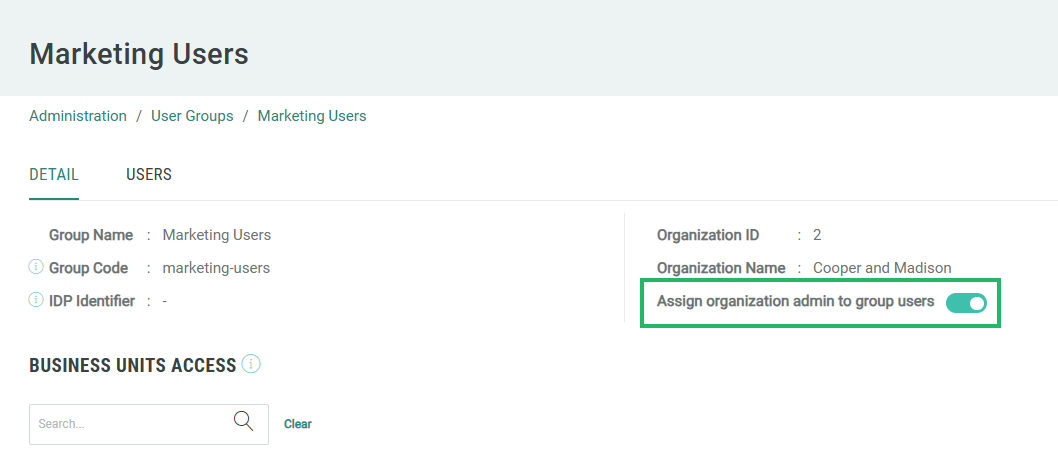
Optionally, to automatically make all users in the User Group an Organization Administrator, toggle Assign Organization Admin to Group Users to On.
-
Click Modify Access. The grid of Business Unit / applications becomes editable.
-
Optionally check one or more check boxes to grant access to a specific Business Unit in a specific application.
-
Optionally uncheck one or more check boxes to remove access to a specific Business Unit in a specific application.

-
Optionally, to automatically make all users in the User Group a Business Unit Administrator for a specific Business Unit, toggle Assign BU Admin to On for that Business Unit.
Note: that this toggle is disabled if you enabled the Organization Administrator toggle above, since there’s no need to enable both options for a user, and the Organization Administrator privileges take precedence.

-
Click Save Changes. A confirmation dialog box is displayed; click Yes. Or click Cancel Modify to discard your changes.
-
A success message is displayed, click Ok.
Some Zeta applications provide an option called App Attributes. This option allows Organization Administrators to manually select the desired application-specific Role to which users in this User Group will be assigned, and also to customize the privileges granted to the user by that Role. See Configure Application Role for a User Group for more information.