
You can make content in a Content Block dependent on a variable. Variables are defined in templates and add flexibility when a template is used in a journey. By setting variable values, you can influence the final look and feel of the content.
Example: You want to create a multi-functional button that allows you to adjust its size and alignment. To do this, you create a Content Block for the button and define two variables, such as:
- Color
- Alignment
When you use the template, you fill in these variables to control how the button appears.
Template variables
A template variable exists at the template level. When you use a template variable in a Content Block, the value selected for that variable applies to all Content Blocks in the template that use the same variable.
To use an existing template variable in the Content Block the following syntax is used.
[%[VARIABLE.Name]%]
All content placed between these <sg:conditional> tags depends on the value you set for the variable.
Local variables
A local variable is defined and used directly in a Content Block. Use a local variable when the variable does not yet exist in the template.
Define a local variable
Use the following SG syntax:
<sg:var name="" type="" value="" alias="" description="" />You can define following variable properties:
- Name — The internal name of the variable.
- Type — Determines the expected value and how it appears in the interface:
- Text: Text field
- Color: Color picker
- Boolean: Checkbox
- Default value (optional) — Automatically applied when the variable is used.
- Alias (optional) — Display name shown in the Content Block properties. If not provided, the variable name is used.
- Description (optional) — Helper text shown below the variable field in the Content Block properties.
Variable type examples
<sg:var name="MyText" type="Text" value="mytext" alias="my_alias" description="my_description" />

<sg:var name="Mycolor" type="Color" value="#0000FF" alias="my_alias" description="my_description" />

<sg:var name="MyName" type="Number" value="75" alias="my_alias" description="my_description" />

<sg:var name="MyBoolean" type="Boolean" value="TRUE" alias="my_alias" description="my_description" />

<sg:var name="MyDecimal" type="Decimal" value="0,01" alias="my_alias" description="my_description" />

<sg:var name="MyDateTime" type="Datetime" value="2019-10-17 10:00" alias="my_alias" description="my_description" />

<sg:var name="MyDate" type="Date" value="2019-10-17" alias="my_alias" description="my_description" />

<sg:var name="MyTime" type="Time" value="10:00" alias="my_alias" description="my_description" />

<sg:var name="My_image" type="image" value="" />
How variables appear in the interface
When a Content Block contains variables:
- Boolean variables appear as toggles.
- Text variables appear as text fields.
- Color variables appear as color pickers.
The alias and description help users understand how to configure each variable.
Example:
On the left, the Content Block created in the Library chapter, contains 3 variables of type boolean, text, and color.
On the right, when using the Content Block in a message, the properties window displays all 3 variables (boolean as a toggle, text as a text field, color as a color picker), with their alias and description. 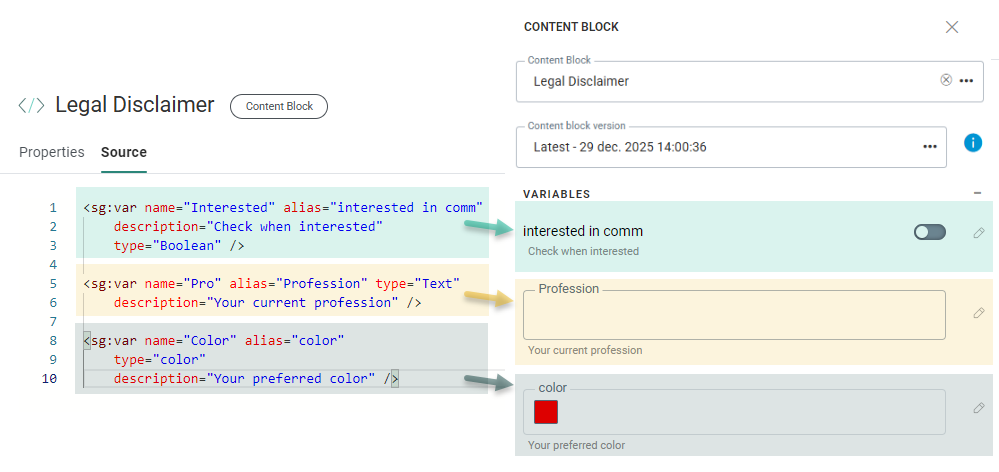
Define multiple variable options
You can use <sg:option> to define a list of allowed values for a variable.
<sg:var name="MyValues" type="text" value="option2">
<sg:option value="option1">Option 1</sg:option>
<sg:option value="option2">Option 2</sg:option>
</sg:var>
Example 1: Variable-based color selection
In this example, a color variable defines the background color of a template header:
- The Content Block contains a color variable with two possible options.
- When you use the Content Block in a template, the color variable appears in the Content Block properties.
- You can toggle between the two color options.
Using the Content Block in a template, the color variable is listed in the Content Block component properties. The 2 color options are displayed, which can be toggled.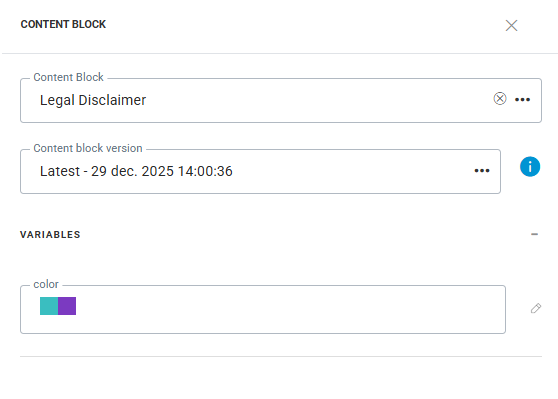
In the style dialog of the template header, adding 'background-color: [color variable name]' as custom style, applies the selected option of the sg:var color variable in the Content Block as background color to the message header (which is currently purple).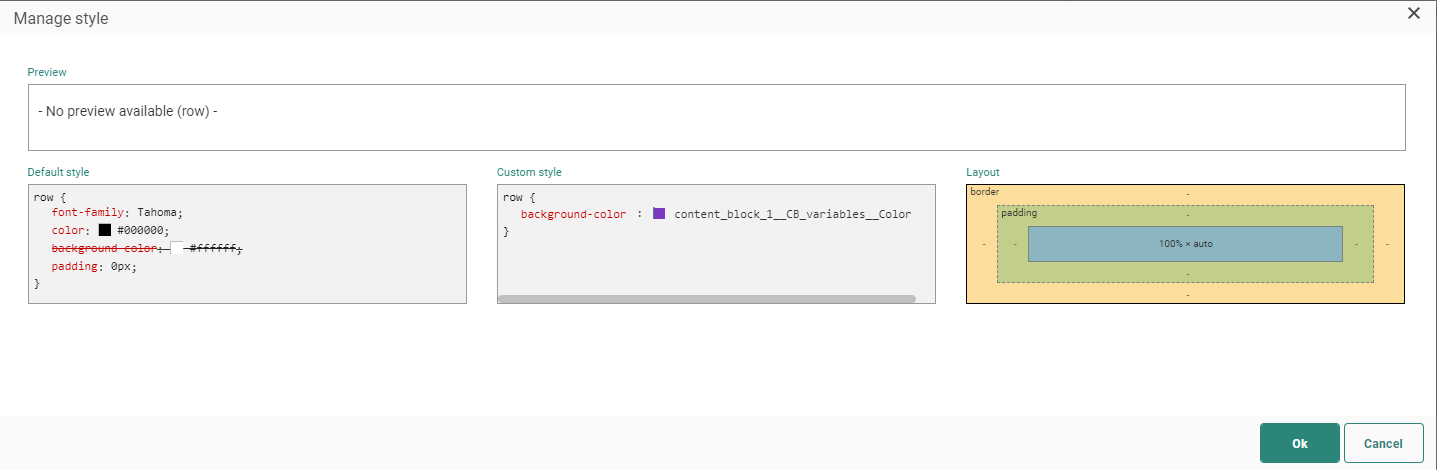
When you switch to the other color option:
- The template header color updates automatically.
- Every section of the template that uses the variable updates as well.
Example 2: Image variable
You can add a variable of type Image to a Content Block and reference it in an image tag. When you use the Content Block in a message, you can select an image for that variable.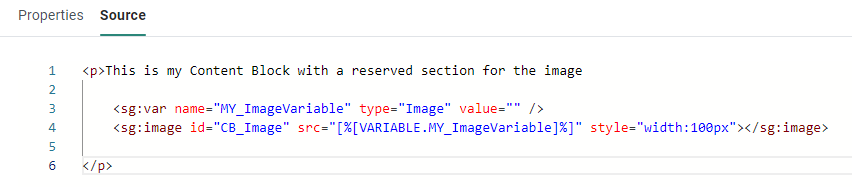
In the message, an image can be selected for this variable: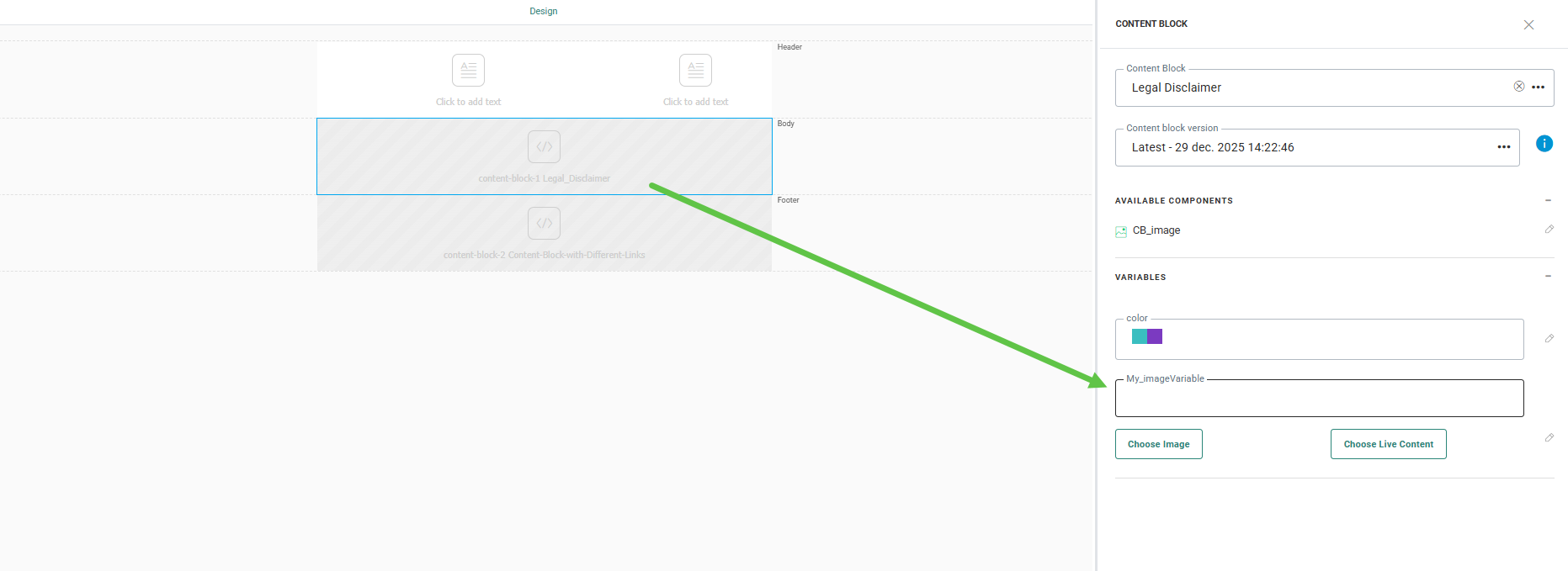
Note: Local variables are defined in the Content Block. For each instance of the Content Block added to a template, you must define the variable value. This allows the same Content Block to be reused multiple times with different appearances.
Template variables are defined once at the template level. The selected value applies to all Content Blocks that use that variable.
More information on the use of Content Blocks with variables can be found in this topic.