
 In some cases you want to limit your journey target audience to only a sample of your contacts. With the Sample Component you can select a sample of records and indicate, in case the journey is executed multiple times, if the sample applies to each individual execution or to all executions.
Keep the following rules in mind when using the Sample Component
- The Sample Component can only be used after a Single Batch or Recurring Batch Component.
- The Sample Component must be followed by an outbound component (email, SMS, Mobile Messages, Custom Channel)
- The Sample Component cannot be combined with a Wave Component when a percentage is used to define the sample records.
- The Sample component cannot be used with a Random Split Component
Properties
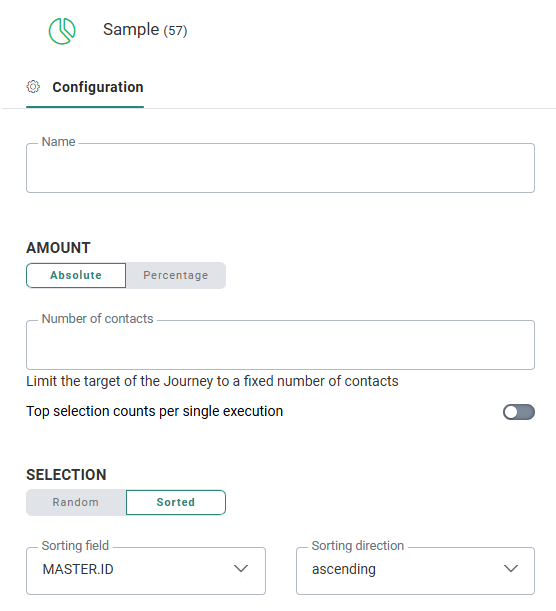
Amount — Defines the number of contacts in the list that should be targeted. You can choose between the following:
- Absolute — Target an absolute number of contacts, ex. 100.
An additional option is available to indicate what this means when there are multiple executions in a Recurring Batch Journey.- When you select the option Sample selection counts per single execution, the number entered is applied at every execution of the journey.
- When you do not select the option Sample selection counts per single execution, the number entered applies to all the executions. This means once the limit is reached, the journey can not be executed anymore and the journey calculation will fail.
- Percentage — Target only a percentage of the contacts, ex. a sample of 10% of the target.
Example: You have a recurring journey that sends out a Promotional email every day with some free vouchers. You only want to send this to a maximum of 100 contacts in your list who have indicated they are interested.
When the option Sample selection counts per single execution is selected, every day maximum 100 emails will be sent. If there are less people in your list, then of course less emails will be sent on that day.
When the option is not selected and the sample applies to all executions, then at the first execution as many emails as there are contacts will be sent with a maximum of 100. At the next execution if the total of 100 is not reached yet, another batch of promotional emails will be sent and this will go on until the total of 100 emails is reached.
Note : 'Sample selection counts per single execution' is only available when setting an absolute number, while it becomes disabled when setting a percentage.
Example: For a sending limit of 100, at every execution a sample of 100 records will be targeted.
Selection — Defines if the sample records need to be selected randomly or if the records first need to be sorted. You can choose between the following:
- Random — Select the records randomly.
- Sort by — Sort the records by a selected field in the list, either ascending or descending.
Example: Select 'Sort by' and 'descending' for the Creation_Date field, to return the most recent records first.
Events
Only one event occurs after the Sample Component: On start. This event is triggered when the selection of the sample records is done.