View an OAuth Application
To view the details and configuration properties of an OAuth Application:
-
Select Admin from the top navigation bar, then select Access > OAuth Applications from the side navigation menu. The OAuth Applications screen is displayed.
-
Search for and select the desired OAuth Application (see Search for an OAuth Application for more information on the available search options). The OAuth Application Details screen is displayed, with the Restrictions tab selected.
-
The header and the tabs on this screen allow you to view various configuration details. See below for details on each of these areas.
Header
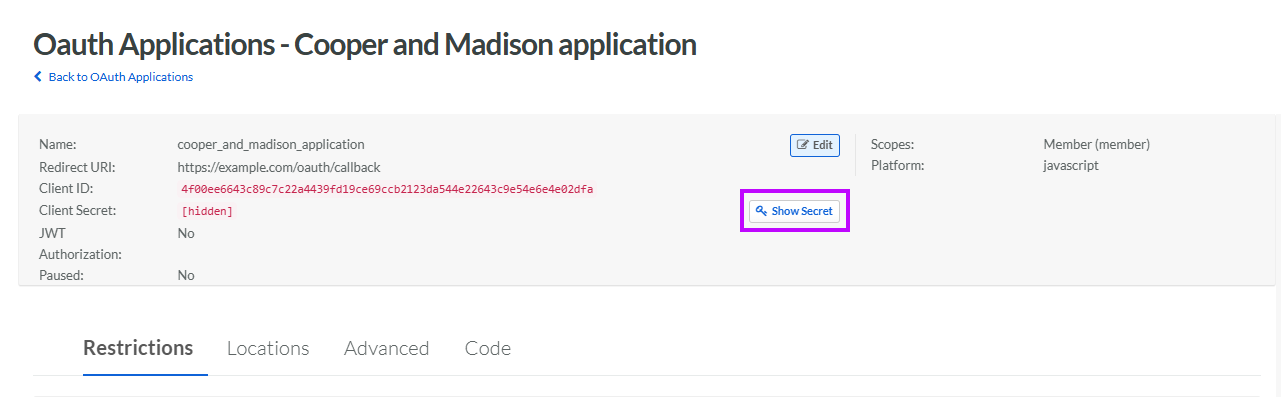
The header area of the OAuth Application Details screen displays many of the high-level properties of this OAuth Application, including its name, Redirect URI, Client ID, and scope. For more information on editing these properties, see Edit OAuth Application Properties.
By default, the Client Secret is hidden. To make it viewable, click Show Secret.
Also from the header area, you can regenerate the Client Secret. See Regenerate a Client Secret for more information.
Also from the header area, you can delete an OAuth Application. See Delete an OAuth Application for more information.
Restrictions Tab
The Restrictions tab of the OAuth Application Details screen allows you to temporarily pause this OAuth Application, making it unusable. Conversely, you can resume a paused OAuth Application. See Pause or Resume an OAuth Application for more information.
Also from this tab, you can allowlist specific endpoints, domains, and IP addresses. See Configure OAuth Application Restrictions for more information.
Locations Tab
The Locations tab of the OAuth Application Details screen allows you to add your store locations to the OAuth Application. See Add a Place to an OAuth Application for more information.
Advanced Tab
The Advanced tab of the OAuth Application Details screen allows you to configure advanced options. See Configure OAuth Application Advanced Options for more information.
Code Tab
The Code tab of the OAuth Application Details screen displays a sample CURL code snippet.