Regenerate a Client Secret
The Client Secret is a confidential component of the OAuth authentication process, analogous to a password. Because possession of the Client Secret may allow another party to impersonate the client application, the Client Secret value needs to be protected, and should never be included in code, documentation, or URLs.
Loyalty allows you to regenerate the Client Secret, which creates a new Client Secret for the OAuth Application. You might need to regenerate the Client Secret as part of a routine credential rotation, or if the existing secret has been compromised. Note that after you regenerate he Client Secret, you must also update any integrations that use the previous Client Secret, as it will no longer work.
To regenerate the Client Secret for an OAuth Application:
-
Select Admin from the top navigation bar, then select Access > OAuth Applications from the side navigation menu. The OAuth Applications screen is displayed.
-
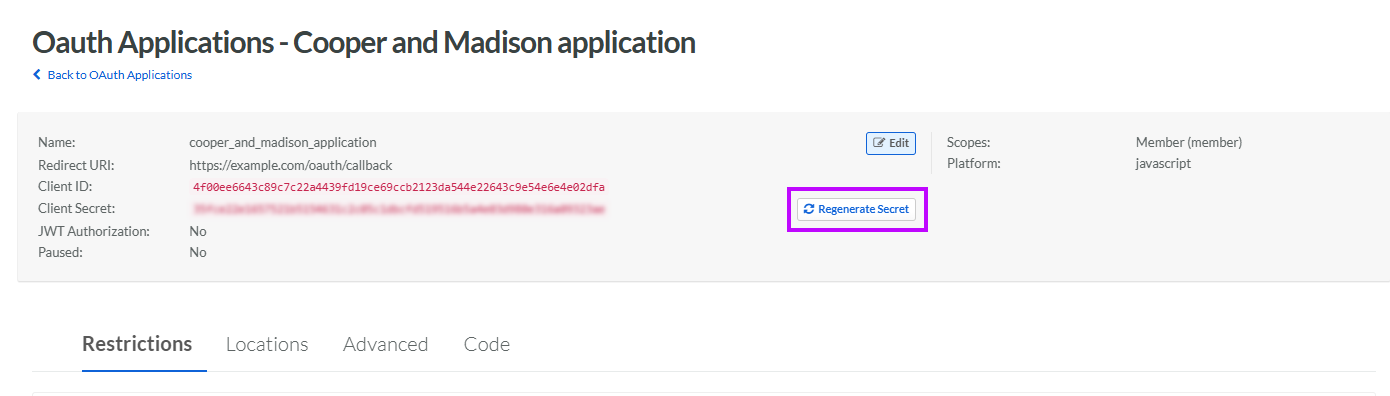
Search for and select the desired OAuth Application (see Search for an OAuth Application for more information on the available search options). The OAuth Application Details screen is displayed, with the Restrictions tab selected.
-
Within the Header area of the OAuth Application Details screen, click Show Secret. The platform reveals the current Client Secret.
-
Click Regenerate Secret. A warning message is displayed; click Continue. A confirmation dialog box is displayed; click Confirm.
-
Click Show Secret to see the new Client Secret.