Pause or Resume an OAuth Application
The Loyalty platform allows you to pause an OAuth Application. Pausing an OAuth Application temporarily prevents it from being used to request access, without having to delete the entire OAuth Application. For example, you might pause an OAuth Application to investigate a security issue, or to test a configuration change. When ready, you can resume the OAuth Application.
To pause an OAuth Application:
-
Select Admin from the top navigation bar, then select Access > OAuth Applications from the side navigation menu. The OAuth Applications screen is displayed.
-
Search for and select the desired OAuth Application (see Search for an OAuth Application for more information on the available search options). The OAuth Application Details screen is displayed, with the Restrictions tab selected.
-
Within the Requests section, click Edit. A confirmation dialog box is displayed; click Confirm. The Edit OAuth Application pop-up window is displayed.
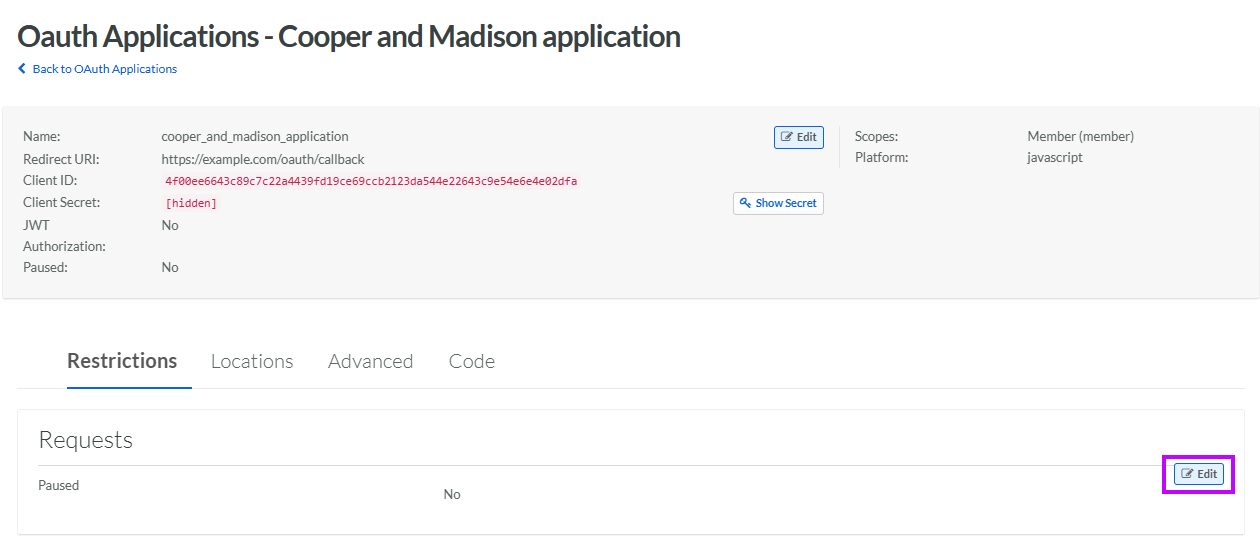
-
Check Paused.
-
Click Save.
To resume a paused OAuth Application:
-
Select Admin from the top navigation bar, then select Access > OAuth Applications from the side navigation menu. The OAuth Applications screen is displayed.
-
Search for and select the desired OAuth Application (see Search for an OAuth Application for more information on the available search options). The OAuth Application Details screen is displayed, with the Restrictions tab selected.
-
Within the Requests section, click Edit. A confirmation dialog box is displayed; click Confirm. The Edit OAuth Application pop-up window is displayed.
-
Uncheck Paused.
-
Click Save.