
Define the Query Code
When you create a Query in Loyalty, you must select its Execution Type. The Execution Type represents the language the Query is written in, and also the engine the platform uses to execute the Query. The platform allows you to define different Query execution syntaxes for the same Query. For example, you could enter both a Hive and a Trino version of the same Query. You can then toggle between the different Execution Types, and select the one you want to execute (see Refresh a Query for more information).
This topic assumes that you have already created the Query (see Create a Query for more information).
To define the code for your Query:
-
Select Analytics from the top navigation bar, then select Settings > Queries from the side navigation menu. The Analytics Queries screen is displayed.
-
Optionally, search for and select the desired Query (see
-
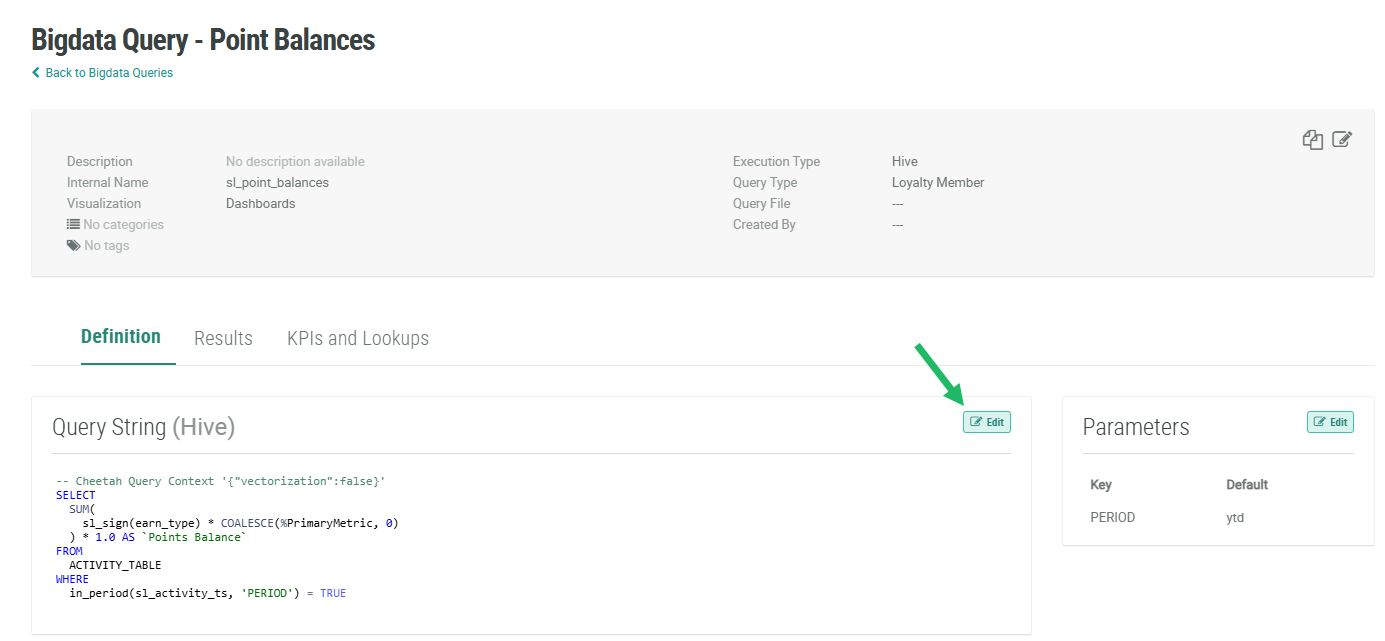
Within the Query String section, click Edit. The code field is displayed as an editable code editor.
-
The Execution Type drop-down menu is populated with the currently selected Execution Type for this Query. Optionally, select a different Execution Type. Then, within the code editor, enter the appropriate Query syntax for the selected Execution Type.
-
Click Save.
Note: The platform allows you to enter multiple Execution Types for a Query. For example, you could enter both a Hive and a Trino version of the same Query. The Execution Type that is selected when you click Save is the one the platform will process when you execute the Query. The currently selected Execution Type is always displayed within the Query String section.

