
Resubmit an Activity
The Loyalty platform allows you to edit and resubmit an Activity from the Member Details screen.
To resubmit an Activity:
-
Select Members from the top navigation bar, then select Members > Members from the side navigation menu. The Members screen is displayed.
-
On the Members screen, search for and select the desired Member (see Search for a Member for more information). The Member Details screen is displayed with the Metrics tab selected by default.
-
Optionally apply a filter to limit the Activities displayed on the screen; see Member Details Tab Overview - Metrics for more information on the filter options.
-
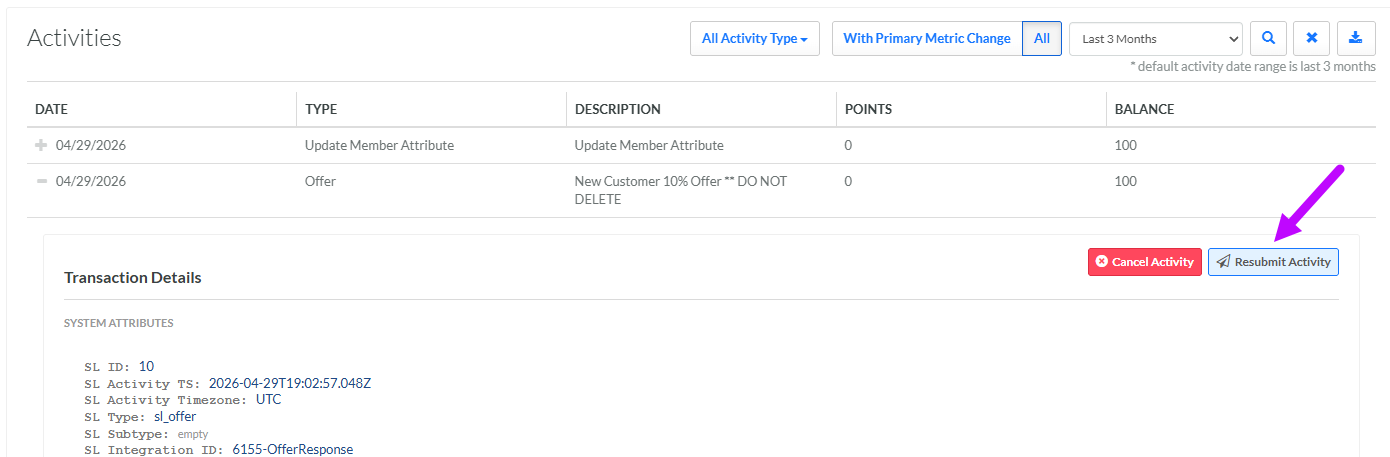
Click the Expand icon next to the desired Activity. The platform shows the full details of the Activity.
-
Within the expanded Activity details, click Resubmit Activity. The Resubmit Activity pop-up window is displayed and populated with the full details of the selected Activity record.
-
Make any necessary changes to the Attributes within the Activity record.
-
Click Submit.
