
Connection Profile Configuration - Cheetah Digital
Cheetah Digital Connection Profiles are used to integrate the Loyalty platform with the Cheetah Digital platform, usually for the purposes of using Cheetah Digital to deploy email messages.
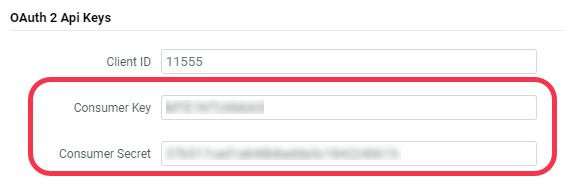
To create the Cheetah Digital Connection Profile, you will need the Consumer Key and Consumer Secret for a system user within the desired Cheetah Digital account. To look up these values:
-
Log into Cheetah Digital using the desired system user account.
-
From the navigation menu, select Data Integration > API Keys. The API Access screen is displayed.
-
Make a note of the Consumer Key and Consumer Secret values displayed within the OAuth 2 API Keys section, as you will need these values below when you create the Connection Profile.
This Connection Profile type includes the following properties:
-
Label: Enter the display name of the Connection Profile.
-
Internal Name: Enter the internal system name of the Connection Profile. This field is uneditable by default. To edit the Internal Name, check Edit Internal Name. A confirmation dialog box is displayed; click Ok. Edit the Internal Name value.
-
Send Pipeline: Select Advanced Event Trigger (AET).
Note: The Smart Messaging Framework Send Pipeline option has been deprecated and is no longer supported.
-
Base URL: Enter the Advanced Event Trigger API endpoint based on your region:
-
North America: https://aet.eccmp.com/services2
-
Europe: https://api.ccmp.eu/services2
-
Japan: https://api.marketingsuite.jp/services2
-
-
Access Token URL: Enter the following:
-
https://api.eccmp.com/services2/authorization/oAuth2/Token
-
-
Username: Enter the Consumer Key for the Cheetah Digital system user (see above for details on where to find this value).
-
Password: Enter the Consumer Secret for the Cheetah Digital system user (see above for details on where to find this value).
-
Token Expiration: Enter the duration of the authentication token (in seconds).
