Export a Query Dashboard
The platform provides several options for exporting a Query Dashboard:
-
Export a Panel as a PNG image file
-
Export the data from a Panel as a CSV file
-
Export the entire Dashboard as a JSON file
Export a Panel as an Image
To export a single Panel of a Query Dashboard as a PNG image file:
-
Navigate to and select the desired Query Dashboard through either of the following methods:
-
Select Analytics from the top navigation bar, then select the desired Query Dashboard from the side navigation menu. The Query Dashboard contents are displayed in "view" mode.
-
Select Analytics from the top navigation bar, then select Settings > Dashboards from the side navigation menu. The Dashboards screen is displayed and populated with all the standard and custom Dashboards defined in your Loyalty account. Click the name of the desired Query Dashboard. The Query Dashboard contents are displayed in "view" mode.
-
-
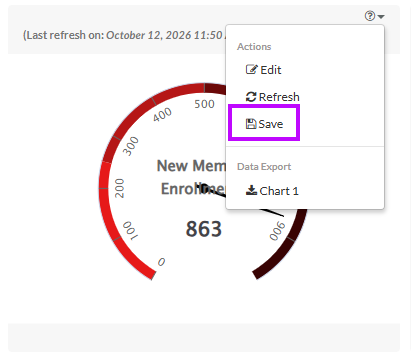
Within the desired Panel, click the arrow in the top-right corner, then select Save. The platform downloads the Panel as a PNG file.
Export the Data from a Panel
To export the data from a single Panel of a Query Dashboard:
-
Navigate to and select the desired Query Dashboard through either of the following methods:
-
Select Analytics from the top navigation bar, then select the desired Query Dashboard from the side navigation menu. The Query Dashboard contents are displayed in "view" mode.
-
Select Analytics from the top navigation bar, then select Settings > Dashboards from the side navigation menu. The Dashboards screen is displayed and populated with all the standard and custom Dashboards defined in your Loyalty account. Click the name of the desired Query Dashboard. The Query Dashboard contents are displayed in "view" mode.
-
-
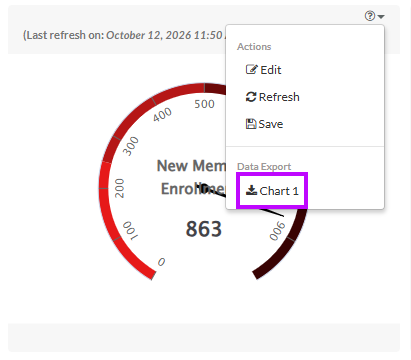
Within the desired Panel, click the arrow in the top-right corner, then select Chart 1 (or Chart 2 for a Dual Chart). The platform downloads the data as a CSV file to your local PC.
Export the Entire Query Dashboard
To export the entire Query Dashboard as a JSON file:
-
Navigate to and select the desired Query Dashboard through either of the following methods:
-
Select Analytics from the top navigation bar, then select the desired Query Dashboard from the side navigation menu. The Query Dashboard contents are displayed in "view" mode.
-
Select Analytics from the top navigation bar, then select Settings > Dashboards from the side navigation menu. The Dashboards screen is displayed and populated with all the standard and custom Dashboards defined in your Loyalty account. Click the name of the desired Query Dashboard. The Query Dashboard contents are displayed in "view" mode.
-
-
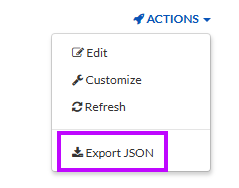
From the Actions drop-down menu in the top-right corner of the screen, select Export JSON. The platform downloads the Query Dashboard as a JSON file to your local PC.